
In the intricate world of computer components, the motherboard is the unsung hero that orchestrates the symphony of data flowing through your system. But just like any technology, motherboards have a lifespan. In this comprehensive guide, we explore the primary question: How long does a motherboard last? From the factors that can affect its longevity to signs of a failing motherboard, we’ve got you covered.
How Long Does a Motherboard Last?
The lifespan of a motherboard depends on various factors. On average, a motherboard can last anywhere from 5 to 10 years. However, this is a general estimate, and individual experiences may vary based on usage, maintenance, and environmental conditions.
What Can Shorten A Motherboard’s Lifespan?
- Overheating: Excessive heat can lead to the degradation of components over time, shortening the lifespan.
- Electrical Surges: Sudden power spikes can damage sensitive components, affecting the motherboard’s longevity.
- Poor Maintenance: Neglecting regular cleaning and maintenance can contribute to the buildup of dust and debris, impacting performance and lifespan.
- Inadequate Power Supply: Using an insufficient or unstable power supply can strain the motherboard, potentially reducing its lifespan.
How Long Does a Laptop Motherboard Last?
Laptop motherboards, being more compact and prone to heat, generally have a lifespan similar to that of desktop motherboards. On average, you can expect a laptop motherboard to last between 5 to 7 years. However, factors like heat dissipation and usage patterns play a significant role in determining its longevity.
How Long Does a Gaming Motherboard Last?
Gaming motherboards are often subjected to more intense usage due to high-performance requirements. While a well-maintained gaming motherboard can last 7 to 10 years, the strain from demanding games and overclocking practices can potentially shorten this lifespan. Adequate cooling and careful usage are essential for maximising the lifespan of a gaming motherboard.
How Long Does an Average Motherboard Last?
An average motherboard, used in a standard desktop setup with regular maintenance, can last around 7 to 10 years. However, advancements in technology and changing hardware requirements may prompt upgrades before a motherboard reaches the end of its natural lifespan.
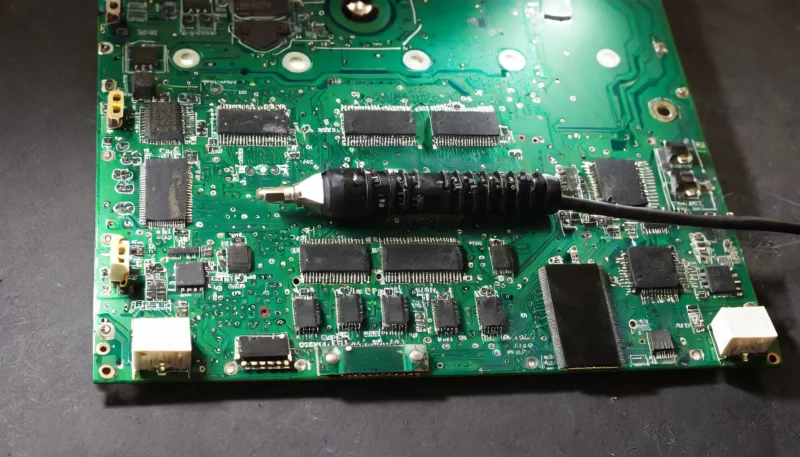
5 Tips To Increasing Motherboard Life Span
- Proper Cooling: Ensure that your system has adequate cooling to prevent overheating. Invest in quality fans and cooling solutions to maintain optimal temperatures.
- Regular Maintenance: Clean your computer regularly to prevent dust buildup. Dust can trap heat and affect the motherboard’s performance.
- Stable Power Supply: Use a stable and sufficient power supply. Unstable power sources can lead to electrical surges that may damage the motherboard.
- Avoid Overclocking: While overclocking can boost performance, it puts additional strain on the motherboard. Use caution and consider the potential impact on longevity.
- Environmental Factors: Keep your computer in a clean and well-ventilated space. Avoid extreme temperatures and humidity, as they can affect electronic components.
Signs and Symptoms of a Failing Motherboard:
- System Instability: Frequent crashes, freezes, or unexpected reboots can be indicative of motherboard issues.
- Blue Screen of Death (BSOD): Repeated occurrences of the BSOD may signal underlying hardware problems, including motherboard issues.
- Unresponsive USB Ports: If USB ports stop working or exhibit erratic behavior, the motherboard may be failing.
- isual Inspection: Physical damage, burnt areas, or leaking capacitors on the motherboard are clear signs of potential failure.
How long does a motherboard typically last?
On average, a motherboard can last between 5 to 10 years, depending on usage, maintenance, and environmental conditions.
Can overheating shorten a motherboard’s lifespan?
Yes, excessive heat can lead to component degradation and impact the lifespan of a motherboard.
What is the lifespan of a laptop motherboard?
Laptop motherboards generally last between 5 to 7 years, influenced by factors like heat dissipation and usage patterns.
How can I increase the lifespan of my motherboard?
Proper cooling, regular maintenance, using a stable power supply, avoiding overclocking, and considering environmental factors can contribute to increased motherboard longevity.
Are gaming motherboards more prone to failure?
Gaming motherboards may experience more intense usage, but with proper care, they can last between 7 to 10 years.
What are the signs of a failing motherboard?
Signs include system instability, frequent crashes, the appearance of the Blue Screen of Death, unresponsive USB ports, and visual indications of physical damage on the motherboard.

With over a decade of hands-on experience in troubleshooting PC hardware and gaming software, Stanley Kessler is our go-to expert for solving complex technical problems. He creates clear, step-by-step guides that help gamers navigate everything from motherboard BIOS issues to in-game bugs. Stanley’s passion is empowering readers to fix their own tech problems and get back to gaming faster.