
In the ever-evolving landscape of computer hardware, the M.2 slot has emerged as a crucial element, offering high-speed storage solutions in a compact form. Whether you’re a seasoned tech enthusiast or a novice builder, understanding the intricacies of M.2 slots on motherboards is essential. In this comprehensive guide, we’ll explore the types of M.2 slots, the number of M.2 slots on different motherboard form factors, and answer common questions about M.2 technology.
What is an M.2 Slot On the Motherboard?
The M.2 slot is a small, versatile connector on motherboards designed to support high-speed storage devices, such as SSDs. It comes in different key types and is a game-changer in terms of storage technology.
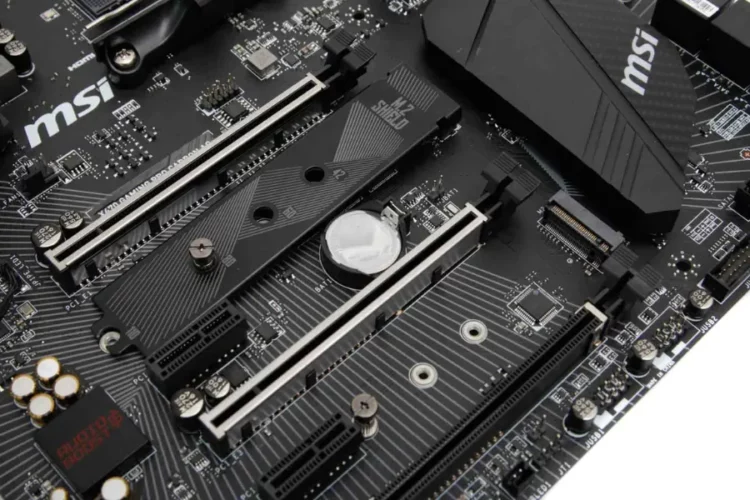
Types of M.2 Slots On a Motherboard
Explore the variations in M.2 slots, including PCIe and SATA types, each offering distinct advantages.
- PCIe M.2 Slots: PCIe M.2 slots leverage the PCIe interface to deliver faster data transfer rates, making them ideal for high-performance storage solutions.
- SATA M.2 Slots:SATA M.2 slots utilize the SATA interface, offering compatibility with traditional SATA SSDs. While not as fast as PCIe, they still provide a significant speed boost compared to HDDs.
How Many M.2 Slots are on a Motherboard?
The number of M.2 slots on a motherboard can vary based on the motherboard’s form factor.
1) EATX Motherboards
Explore the possibilities for multiple M.2 slots on Extended ATX (EATX) motherboards, catering to enthusiasts who demand extensive storage options.
2) ATX Motherboards
Standard ATX motherboards strike a balance, typically featuring multiple M.2 slots to accommodate diverse storage needs.
3) Micro ATX Motherboards
Micro ATX motherboards, being more compact, may have fewer M.2 slots but are still designed to provide efficient storage solutions.
4) Mini ITX Motherboards
Compact Mini ITX motherboards may have limited space, often featuring a single M.2 slot to optimize space utilization.
Related Article: Micro ATX vs Mini ITX vs ATX Comparison
Which Motherboard Has M.2 Slot?
M.2 slots are found on both laptops and desktop motherboards, providing a compact and versatile form factor for high-speed storage solutions. Here is a list differentiating between laptop and desktop motherboards in terms of M.2 slots:
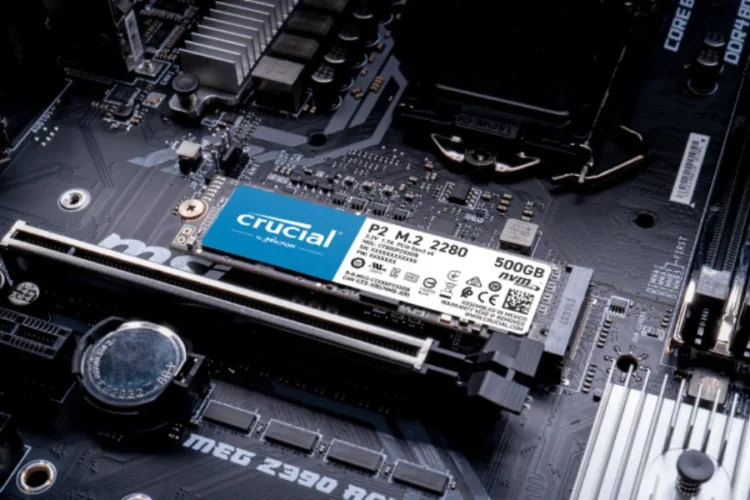
Desktop Motherboards:
1) ASUS ROG Strix B550-F Gaming (Wi-Fi 6) ATX Motherboard
- Features multiple M.2 slots for PCIe 4.0 SSDs.
- Suitable for gaming and high-performance desktop builds.
2)Gigabyte B450 AORUS PRO WIFI ATX Motherboard:
- Equipped with dual M.2 slots for NVMe SSDs.
- Offers Wi-Fi connectivity for added convenience.
3) MSI MPG B550 GAMING EDGE WIFI ATX Motherboard:
- Supports PCIe 4.0 M.2 slots for ultra-fast storage.
- Features Wi-Fi 6 connectivity and a range of gaming-oriented features.
4) ASRock B550M-ITX/ac Mini ITX Motherboard:
- Compact Mini ITX form factor with an M.2 slot.
- Suitable for small form factor (SFF) desktop builds.
Laptop Motherboards:
1) Dell XPS 13 Laptop:
- Incorporates an M.2 slot for PCIe NVMe SSD.
- Known for its slim and stylish design.
2) Lenovo Legion 5 Gaming Laptop:
- Features M.2 slots for PCIe SSDs.
- Tailored for gaming performance on the go.
3) HP Spectre x360 Convertible Laptop:
- Equipped with M.2 slots for fast PCIe SSD storage.
- Offers a 2-in-1 convertible design.
4) ASUS ROG Zephyrus G14 Gaming Laptop:
- Compact gaming laptop with M.2 slots for PCIe NVMe SSDs.
- Known for its powerful performance in a portable form factor.
How do I know if my motherboard has an M.2 slot?
Check your motherboard’s specifications on the manufacturer’s website or refer to the user manual. The presence of an M.2 slot will be clearly indicated.
Is M.2 faster than SSD?
M.2 is a form factor that encompasses both SATA and PCIe-based SSDs. PCIe-based M.2 SSDs are generally faster than traditional SATA SSDs.
Which is faster, M.2 or NVMe?
M.2 and NVMe are not mutually exclusive. M.2 refers to the form factor, while NVMe is a protocol that can be used with M.2 SSDs for faster data transfer.
Do all motherboards have M.2 slots?
No, not all motherboards have M.2 slots. The presence of M.2 slots depends on the motherboard’s design and intended use.
How many M.2 slots can I have on my motherboard?
The number of M.2 slots varies by motherboard. High-end motherboards may have multiple M.2 slots, while smaller form factors may have fewer.
Can I use both SATA and PCIe M.2 SSDs on the same motherboard?
Yes, many motherboards support both SATA and PCIe M.2 slots, allowing you to use different types of M.2 SSDs simultaneously.

With 15 years of experience as a PC hardware technician, Ben brings a practical, hands-on approach to our PC Components section. He specializes in real-world testing and longevity analysis, explaining how components perform over time. His guides help readers understand the practical side of owning and maintaining a gaming PC.