
The Intel Core i7-11700K processor, part of the “Rocket Lake” family, remains a capable CPU for gaming and productivity tasks. Built on a 14nm process, its 8 cores and 16 threads provide substantial performance, but unlocking its full potential is critically dependent on the motherboard it’s paired with. Choosing the right motherboard is not just about compatibility; it’s about ensuring stable power delivery, access to high-speed connectivity like PCIe 4.0, and having the features you need for your specific build.
This guide offers a purely informational, technical breakdown of various motherboards. We will explore their specifications, objectively analyze their features, and clarify their compatibility with the i7-11700K to provide a comprehensive resource for your PC building journey.
Understanding Motherboard Compatibility for the i7-11700K
The Intel i7-11700K uses the LGA 1200 socket. This means it is physically compatible with motherboards featuring Intel’s 400-series and 500-series chipsets. However, for optimal performance and feature support, the 500-series is the intended platform.
Key Chipsets: Z590 vs. B560
- Z590 Chipset: This is the enthusiast-grade chipset for the i7-11700K. Its primary advantage is the ability to overclock the CPU, which is a key feature of the “K” series processors. Z590 boards also typically offer more PCIe lanes, more robust power delivery systems (VRMs), and more extensive connectivity options.
- B560 Chipset: This is a mainstream chipset that offers an excellent balance of features and cost. While B560 motherboards do not support CPU overclocking, they crucially do support memory overclocking. This allows you to run high-speed DDR4 RAM, which provides a significant performance uplift. For users who do not plan to overclock their i7-11700K, a quality B560 board is often a more practical choice.
Making the right choice between these chipsets is a crucial first step. If you’re interested in learning more about the decision-making process, it’s worth considering when you should upgrade your motherboard for a broader perspective on the topic.
Comparative Analysis of Motherboards for the i7-11700K
This table provides a high-level overview of the motherboards discussed in this article. Note that some models listed are not compatible and are analyzed for informational purposes, with suitable alternatives provided.
| Motherboard | Chipset | Form Factor | Max RAM Speed (OC) | PCIe 4.0 x16 | M.2 Slots (Gen4/Gen3) | VRM Design | LAN Speed | Wi-Fi | i7-11700K Compatible? |
| MSI MPG Z490 GAMING EDGE WIFI | Intel Z490 | ATX | DDR4-5000MHz | Yes (1) | 1 / 1 | 12+1+1 | 2.5 GbE | Wi-Fi 6 | Yes (BIOS Update Req.) |
| GIGABYTE B560M DS3H V2 | Intel B560 | Micro-ATX | DDR4-5333MHz | Yes (1) | 1 / 1 | 6+2 | 1 GbE | No | Yes |
| ASUS TUF Gaming H570-PRO WiFi | Intel H570 | ATX | DDR4-5000MHz | Yes (1) | 1 / 2 | 8+1 | 2.5 GbE | Wi-Fi 6 | Yes |
| ASUS Prime Z590-P Wi-Fi | Intel Z590 | ATX | DDR4-5133MHz | Yes (1) | 1 / 2 | 10+1 | 2.5 GbE | Wi-Fi 6 | Yes |
| Gigabyte H470M DS3H | Intel H470 | Micro-ATX | DDR4-2933MHz | No | 0 / 2 | 4+2 | 1 GbE | No | Yes (BIOS Update Req.) |
| MSI PRO H610M-G DDR4 | Intel H610 | Micro-ATX | DDR4-3200MHz | Yes (1) | 0 / 1 | N/A | 1 GbE | No | No (LGA 1700) |
| ASUS Prime B460M-A R2.0 | Intel B460 | Micro-ATX | DDR4-2933MHz | No | 0 / 2 | 6+1+1 | 1 GbE | No | Not Recommended |
| ASRock Z590 Taichi | Intel Z590 | ATX | DDR4-5000MHz | Yes (2) | 1 / 2 | 12+2 | 2.5 GbE / 1 GbE | Wi-Fi 6E | Yes |
| JGINYUE B85 Micro ATX | Intel B85 | Micro-ATX | DDR3-1600MHz | No | No | N/A | 100 Mbps | No | No (LGA 1150) |
| ASUS ROG Maximus Z690 Hero | Intel Z690 | ATX | DDR5-6400MHz | Yes (2) | 2 / 1 | 20+1 | 2.5 GbE | Wi-Fi 6E | No (LGA 1700) |
Detailed Motherboard Reviews and Compatibility Analysis
Below is a detailed examination of each motherboard. Each entry clarifies compatibility and provides an objective look at its features and specifications.
1. MSI MPG Z490 GAMING EDGE WIFI
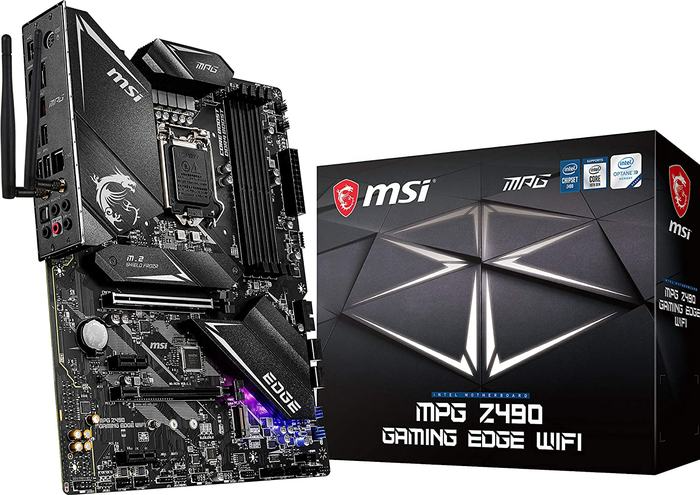
Current Status & Specifications (2025)
- Chipset: Intel Z490
- Socket: LGA 1200
- Form Factor: ATX
- Memory: 4x DDR4 DIMM, up to 128GB, speeds up to 5000MHz (OC)
- PCIe Slots: 1x PCIe 4.0 x16, 1x PCIe 3.0 x16 (x4 mode), 2x PCIe 3.0 x1
- Storage: 2x M.2 slots (1x Gen4 with 11th Gen CPU, 1x Gen3), 6x SATA 6Gb/s
- VRM: 12+1+1 Duet Rail Power System
- Networking: Intel 2.5GbE LAN, Intel Wi-Fi 6
- Status: This is an older generation board but is compatible with the i7-11700K after a mandatory BIOS update. It is still found on the secondary market.
Objective Analysis
The MSI MPG Z490 GAMING EDGE WIFI was a popular mid-range board during its time. Its key advantage, when paired with an i7-11700K, is that its top PCIe x16 and M.2 slots are activated to run at PCIe 4.0 speeds. The 12+1+1 phase power design is sufficient for handling the i7-11700K, even with moderate overclocking. The inclusion of 2.5GbE LAN and Wi-Fi 6 keeps its connectivity relevant.
Key Takeaway: For users who may already own this board or find it at a significant discount, it remains a viable option. However, the absolute requirement to update the motherboard BIOS before installing the 11th Gen CPU can be a hurdle for new builders without an older 10th Gen CPU on hand.
2. GIGABYTE B560M DS3H V2
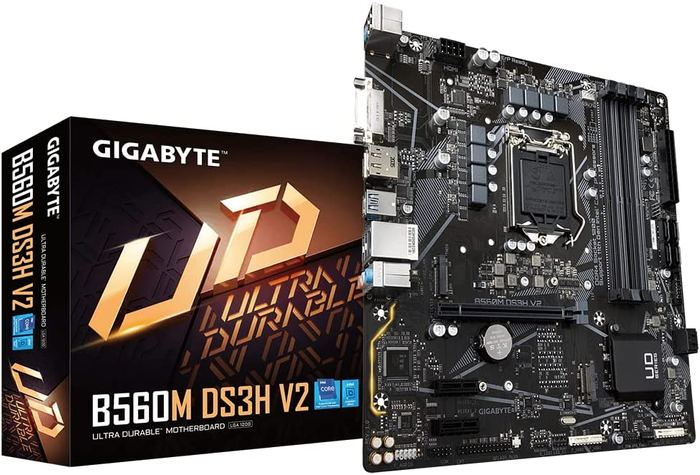
Current Status & Specifications (2025)
- Chipset: Intel B560
- Socket: LGA 1200
- Form Factor: Micro-ATX
- Memory: 4x DDR4 DIMM, up to 128GB, speeds up to 5333MHz (OC)
- PCIe Slots: 1x PCIe 4.0 x16, 2x PCIe 3.0 x1
- Storage: 1x M.2 slot (Gen4), 1x M.2 slot (Gen3), 6x SATA 6Gb/s
- VRM: 6+2 phase digital VRM
- Networking: Realtek 1GbE LAN
- Status: Widely available as a budget-friendly B560 option.
Objective Analysis
The GIGABYTE B560M DS3H V2 is a cost-effective entry point for the i7-11700K platform. It correctly supports PCIe 4.0 for the primary graphics card slot and one M.2 SSD. Crucially for a B560 board, it allows for high-speed memory overclocking, which is essential for maximizing the performance of the 11700K. The 6+2 phase VRM is adequate for running the CPU at stock settings, but it is not designed for pushing the processor’s power limits. Its connectivity is basic, with 1GbE LAN and no built-in Wi-Fi. The question of do you need a good motherboard for gaming often comes down to this trade-off: this board provides the essentials to make the CPU run well, but without the premium features of more expensive models.
3. ASUS TUF Gaming H570-PRO Wi-Fi 6
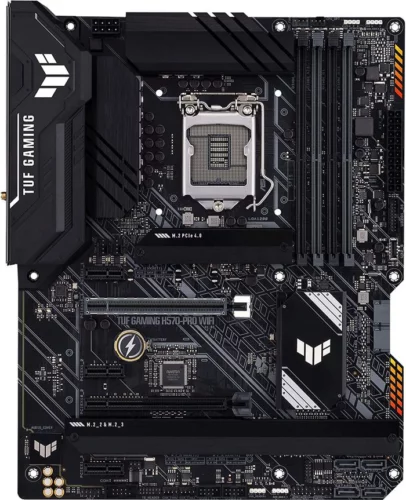
Current Status & Specifications (2025)
- Chipset: Intel H570
- Socket: LGA 1200
- Form Factor: ATX
- Memory: 4x DDR4 DIMM, up to 128GB, speeds up to 5000MHz (OC)
- PCIe Slots: 1x PCIe 4.0 x16, 1x PCIe 3.0 x16 (x4 mode), 3x PCIe 3.0 x1
- Storage: 1x M.2 slot (Gen4), 2x M.2 slots (Gen3), 6x SATA 6Gb/s
- VRM: 8+1 DrMOS power stages
- Networking: Intel 2.5GbE LAN, Intel Wi-Fi 6
- Status: Available, occupying a space between B560 and Z590 boards.
Objective Analysis
The H570 chipset is a less common middle ground. Like B560, it supports memory overclocking but not CPU overclocking. The ASUS TUF Gaming H570-PRO offers a robust feature set, including a capable 8+1 power stage design, three M.2 slots for ample storage, and modern networking with 2.5GbE LAN and Wi-Fi 6. It’s a well-built, durable option for users who want premium features without the CPU overclocking capabilities (and associated cost) of a Z590 board.
4. ASUS Prime Z590-P Wi-Fi
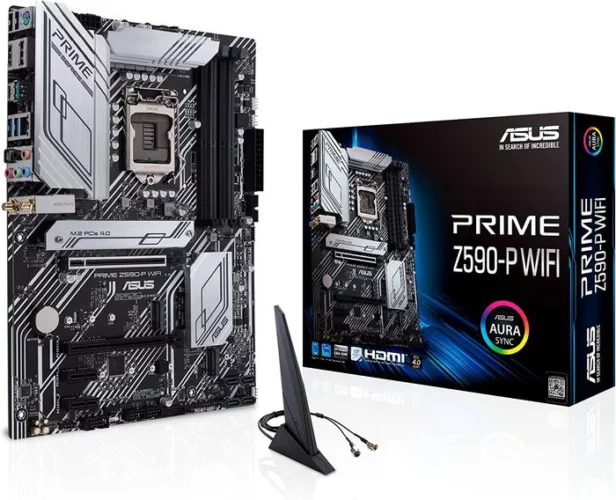
Current Status & Specifications (2025)
- Chipset: Intel Z590
- Socket: LGA 1200
- Form Factor: ATX
- Memory: 4x DDR4 DIMM, up to 128GB, speeds up to 5133MHz (OC)
- PCIe Slots: 1x PCIe 4.0 x16, 1x PCIe 3.0 x16 (x4 mode), 2x PCIe 3.0 x1
- Storage: 1x M.2 slot (Gen4), 2x M.2 slots (Gen3), 4x SATA 6Gb/s
- VRM: 10+1 DrMOS power stages
- Networking: Realtek 2.5GbE LAN, Intel Wi-Fi 6
- Status: Available, positioned as an entry-level Z590 motherboard.
Objective Analysis
The ASUS Prime Z590-P Wi-Fi is designed for users who want to leverage the CPU overclocking capabilities of the i7-11700K without investing in a top-tier enthusiast board. Its 10+1 power stage design is a significant step up from most B560 boards and provides a solid foundation for overclocking. It includes a full complement of modern features: PCIe 4.0, three M.2 slots, 2.5GbE LAN, and Wi-Fi 6. This board represents a balanced approach, delivering the key benefits of the Z590 chipset in a more accessible package.
5. Gigabyte H470M DS3H
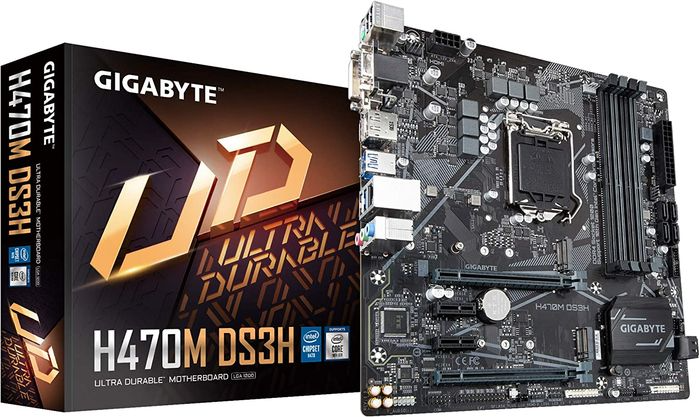
Current Status & Specifications (2025)
- Chipset: Intel H470
- Socket: LGA 1200
- Form Factor: Micro-ATX
- Memory: 4x DDR4 DIMM, up to 128GB, at a maximum of 2933MHz
- PCIe Slots: 1x PCIe 3.0 x16, 1x PCIe 3.0 x16 (x4 mode), 2x PCIe 3.0 x1
- Storage: 2x M.2 slots (Gen3), 4x SATA 6Gb/s
- VRM: 4+2 phase hybrid digital VRM
- Networking: Intel 1GbE LAN
- Status: Largely superseded by 500-series boards. Requires a BIOS update for 11th Gen CPU support.
Objective Analysis
While the H470M DS3H is technically compatible with the i7-11700K (with a BIOS update), it is a poor pairing. The H470 chipset has two major limitations: it does not support PCIe 4.0, and it limits RAM speed to 2933MHz. These restrictions significantly hamstring the performance potential of the i7-11700K, leaving both GPU and CPU performance on the table. This board should only be considered if it is already owned and there is no budget for an upgrade.
6. MSI PRO H610M-G DDR4
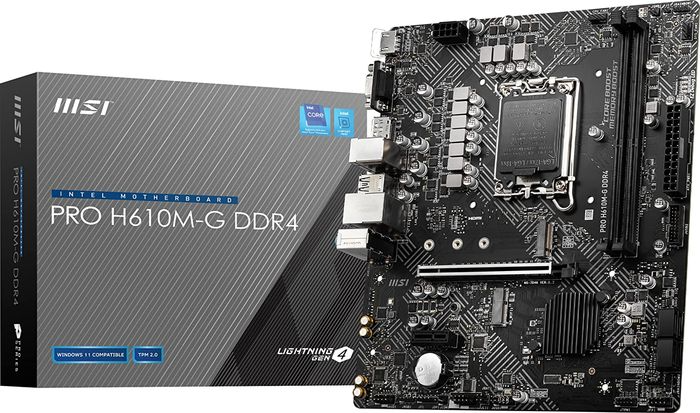
Compatibility Status: Not Compatible
This motherboard uses the LGA 1700 socket and is designed for Intel’s 12th, 13th, and 14th Generation processors. It is physically and electronically incompatible with the LGA 1200-based i7-11700K.
Current Status & Specifications (2025)
- Chipset: Intel H610
- Socket: LGA 1700
- Form Factor: Micro-ATX
- Memory: 2x DDR4 DIMM, up to 64GB, speeds up to 3200MHz
- PCIe Slots: 1x PCIe 4.0 x16, 1x PCIe 3.0 x1
- Storage: 1x M.2 slot (Gen3), 4x SATA 6Gb/s
- Networking: Intel 1GbE LAN
Objective Analysis
The MSI PRO H610M-G is a budget-oriented motherboard for a completely different CPU generation. Its features, such as limited RAM slots and Gen3 M.2, reflect its entry-level positioning in the LGA 1700 ecosystem.
Suggested Alternative: MSI MAG B560M BAZOOKA
For users seeking a budget-friendly, Micro-ATX MSI board that is compatible with the i7-11700K, the MSI MAG B560M BAZOOKA is a far more appropriate choice. It features a stronger VRM than entry-level models, supports high-speed memory overclocking, and provides the essential PCIe 4.0 support for the CPU.
7. ASUS Prime B460M-A R2.0
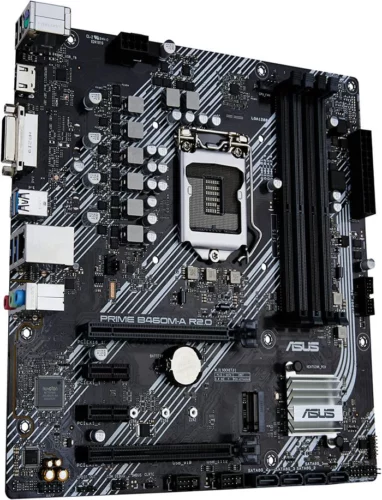
Compatibility Status: Not Recommended
While this board has an LGA 1200 socket, the B460 chipset was not designed for 11th Gen CPUs. Support was added via late BIOS updates, but it is not guaranteed and, more importantly, it lacks PCIe 4.0 support and locks RAM speed to 2933MHz.
Current Status & Specifications (2025)
- Chipset: Intel B460
- Socket: LGA 1200
- Form Factor: Micro-ATX
- Memory: 4x DDR4 DIMM, up to 128GB, at a maximum of 2933MHz
- PCIe Slots: 1x PCIe 3.0 x16, 2x PCIe 3.0 x1
- Storage: 2x M.2 slots (Gen3), 6x SATA 6Gb/s
- Networking: Realtek 1GbE LAN
Objective Analysis
Similar to the H470 board, the ASUS Prime B460M-A R2.0 severely limits the i7-11700K. By forgoing PCIe 4.0 and high-speed RAM, a significant amount of the processor’s potential performance is wasted. It is not a logical choice for a new build. The various motherboard form factors like Micro-ATX vs. Mini-ITX vs. ATX are an important consideration, but chipset capabilities are paramount.
Suggested Alternative: ASUS PRIME B560-PLUS
The ASUS PRIME B560-PLUS is the direct successor and a proper match for the i7-11700K. It is an ATX board that unlocks memory overclocking and enables PCIe 4.0, addressing all the key limitations of its B460 predecessor.
8. ASRock Z590 Taichi
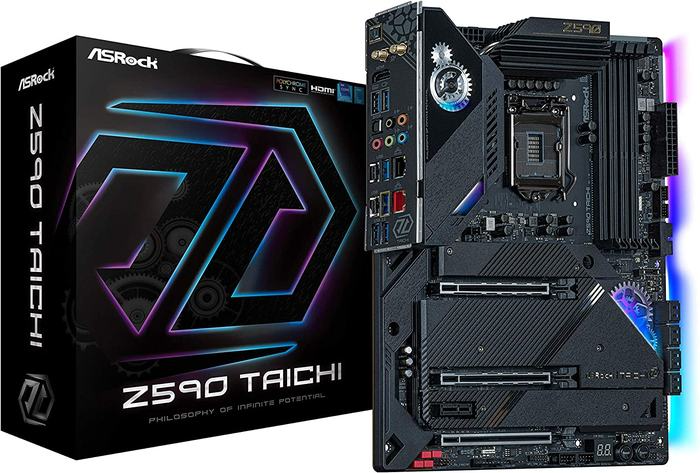
Current Status & Specifications (2025)
- Chipset: Intel Z590
- Socket: LGA 1200
- Form Factor: ATX
- Memory: 4x DDR4 DIMM, up to 128GB, speeds up to 5000MHz (OC)
- PCIe Slots: 2x PCIe 4.0 x16 (x8/x8 mode), 1x PCIe 3.0 x16 (x4 mode), 1x PCIe 3.0 x1
- Storage: 1x M.2 slot (Gen4), 2x M.2 slots (Gen3), 8x SATA 6Gb/s
- VRM: 12+2 phase, 90A Dr.MOS
- Networking: Killer 2.5GbE LAN, Intel 1GbE LAN, Killer Wi-Fi 6E
- Status: A high-end enthusiast motherboard, available primarily on the secondary market.
Objective Analysis
The ASRock Z590 Taichi sits at the premium end of the spectrum. It is built for serious overclocking, with a powerful 12+2 phase, 90A power delivery system designed to push the i7-11700K to its limits. Its features are extensive, including dual PCIe 4.0 x16 slots (for SLI/CrossFire or multiple expansion cards), triple M.2 slots, dual LAN ports, and cutting-edge Wi-Fi 6E. The unique moving gear on the I/O shroud is a stylistic hallmark of the Taichi line. This board is for enthusiasts who want maximum performance and connectivity from the LGA 1200 platform.
9. JGINYUE B85 Micro ATX
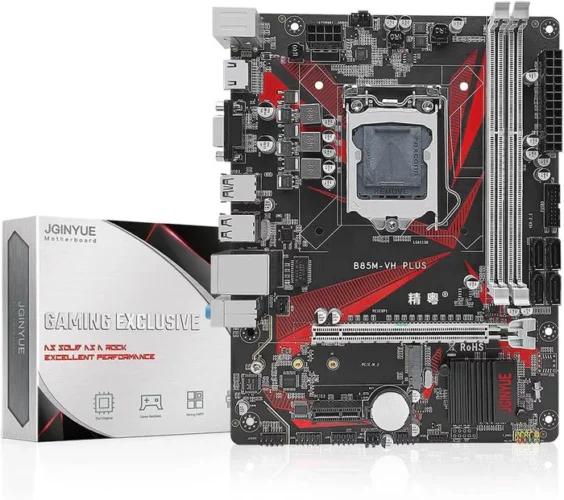
Compatibility Status: Not Compatible
This motherboard uses the LGA 1150 socket and is designed for Intel’s 4th Generation “Haswell” processors. It also uses DDR3 RAM. It is completely incompatible with the i7-11700K.
Current Status & Specifications (2025)
- Chipset: Intel B85
- Socket: LGA 1150
- Form Factor: Micro-ATX
- Memory: 2x DDR3 DIMM
- PCIe Slots: 1x PCIe 3.0 x16
- Storage: SATA ports
- Status: A legacy product from a lesser-known brand, irrelevant for modern builds.
Objective Analysis
This motherboard is from a much older generation of PC hardware. Its specifications, from the B85 chipset to the DDR3 memory support, are several generations behind the i7-11700K’s requirements.
Suggested Alternative: ASRock B560M-HDV
For a user looking for a no-frills, highly affordable, and compatible Micro-ATX board, the ASRock B560M-HDV is a suitable option. It provides the necessary features like PCIe 4.0 support and memory overclocking in one of the most cost-effective packages available.
10. ASUS ROG Maximus Z690 Hero EVA

Compatibility Status: Not Compatible
This motherboard features the LGA 1700 socket and DDR5 memory support, designed for Intel 12th Gen and newer CPUs. It is fundamentally incompatible with the i7-11700K.
Current Status & Specifications (2025)
- Chipset: Intel Z690
- Socket: LGA 1700
- Form Factor: ATX
- Memory: 4x DDR5 DIMM, up to 128GB, speeds over 6400MHz (OC)
- PCIe Slots: 2x PCIe 5.0 x16, 1x PCIe 4.0 x16
- Storage: 2x M.2 (Gen5 ready), 1x M.2 (Gen4), 6x SATA 6Gb/s
- VRM: 20+1 power stages (90A)
- Networking: Intel 2.5GbE LAN, Wi-Fi 6E
- Status: A premium, enthusiast-grade motherboard for the LGA 1700 platform, with a special “Evangelion” anime cosmetic theme.
Objective Analysis
The ROG Maximus Z690 Hero is a flagship product, showcasing technologies like PCIe 5.0 and DDR5 that are not supported by the 11th Gen platform. Its massive 20+1 power stage VRM and extensive feature set are designed for top-tier 12th, 13th, or 14th Gen CPUs.
Suggested Alternative: ASUS ROG Maximus XIII Hero (Z590)
The direct predecessor and proper high-end pairing for the i7-11700K is the ASUS ROG Maximus XIII Hero. This Z590 motherboard offers a similarly powerful VRM (14+2 stage, 90A), extensive cooling, dual 2.5GbE LAN, Wi-Fi 6E, and a premium feature set tailored specifically for the “Rocket Lake” generation. It is the logical choice for an enthusiast building a top-tier i7-11700K system.
Key Factors for Selecting an i7-11700K Motherboard
Choosing the right board involves more than just picking one from a list. Understanding the underlying technology helps in making an informed decision.
VRM and Power Delivery
The Voltage Regulator Module (VRM) converts the 12V power from your PSU into the precise, lower voltage your CPU needs. A more robust VRM with more power phases and higher quality components (like DrMOS) can deliver cleaner, more stable power. This is crucial for the i7-11700K, especially when overclocking, as it ensures the CPU remains stable under heavy load. For stock operation, a mid-range B560 board’s VRM is sufficient; for overclocking, a Z590 board with a 10+ phase design or better is advisable.
Form Factor: ATX vs. Micro-ATX vs. Mini-ITX
The form factor determines the motherboard’s physical size and, consequently, the number of expansion slots and features it can have.
- ATX: The standard size, offering the most PCIe slots, M.2 slots, and connectivity. Ideal for most desktop builds.
- Micro-ATX: A shorter version of ATX, offering fewer PCIe slots but often retaining four RAM slots. A good compromise for smaller cases.
- Mini-ITX: The smallest form factor, typically with only one PCIe slot and two RAM slots. Used for compact, small-form-factor (SFF) builds.
RAM and Memory Support
The i7-11700K officially supports DDR4-3200, but using a B560 or Z590 motherboard allows you to use much faster RAM via overclocking (XMP profiles). Aiming for a kit between 3600MHz and 4000MHz often provides a good balance of performance and stability for this CPU.
PCIe 4.0 Support
One of the key advantages of the 11th Gen platform is its support for PCIe 4.0. This provides double the bandwidth of the previous generation, which is beneficial for modern graphics cards and high-speed NVMe SSDs. Ensure the motherboard you choose has at least one PCIe 4.0 x16 slot and one PCIe 4.0 M.2 slot to take full advantage of this feature.
Storage: M.2 Slots and SATA Ports
Consider your storage needs. If you plan to use multiple high-speed NVMe SSDs, look for a board with several M.2 slots. Knowing how many M.2 slots on a motherboard you need can help narrow your choices. SATA ports are still essential for traditional 2.5-inch SSDs and hard drives.
Connectivity: LAN, Wi-Fi, and USB
- LAN: 2.5GbE LAN is becoming the new standard, offering faster transfer speeds over a wired network compared to the older 1GbE.
- Wi-Fi: If you need wireless connectivity, a board with built-in Wi-Fi 6 or Wi-Fi 6E is ideal for fast, reliable performance.
- USB: Check the rear I/O panel for the number and type of USB ports, ensuring it has enough for your peripherals. Look for faster ports like USB 3.2 Gen 2 or Gen 2×2 for high-speed external drives.
Frequently Asked Questions (FAQ)
What is the best chipset for the i7-11700K?
The Z590 chipset is technically the best as it allows for both CPU and memory overclocking, unlocking the full potential of the “K” series processor. However, for users who do not plan to overclock the CPU, a quality B560 motherboard offers the best value, as it still allows for crucial memory overclocking.
Can I use a Z490 motherboard with an i7-11700K?
Yes, but it is critical to confirm two things: first, that the specific Z490 model received a BIOS update from the manufacturer to support 11th Gen CPUs, and second, that its primary PCIe and M.2 slots were designed to be PCIe 4.0 compliant. A BIOS update is always required.
Does the i7-11700K support DDR5 RAM?
No. The i7-11700K and the entire LGA 1200 platform are exclusively compatible with DDR4 RAM. DDR5 support was introduced with Intel’s 12th Generation (LGA 1700) platform.
How many M.2 slots should I look for?
For most users, two M.2 slots are sufficient: one PCIe 4.0 slot for a fast OS and application drive, and a second (Gen3 or Gen4) for games and other large files. Power users or content creators may benefit from three or more slots.
Do I need to update the BIOS for an i7-11700K?
If you are using a 500-series motherboard (Z590, B560, H570), it will work with the i7-11700K out of the box. If you are attempting to use a 400-series motherboard (Z490, H470), you will need to update the motherboard BIOS before the system will recognize the CPU.
Is a high-end motherboard necessary for gaming with the i7-11700K?
No. A well-made B560 motherboard that allows for high-speed RAM (3600MHz+) and has a decent VRM for stable power delivery will provide a gaming experience that is nearly indistinguishable from a high-end Z590 board at stock CPU speeds. The primary reasons to invest in a high-end board are for CPU overclocking, more extensive connectivity, and more robust expansion options.

Holding a Ph.D. in Computer Science, Dr. Alistair Finch is our chief PC Component Benchmark Analyst. He provides meticulous, data-driven analysis of CPUs and GPUs, moving beyond marketing claims to reveal their true performance. His guides help readers understand the intricate relationship between hardware architecture and real-world gaming frame rates.