
The AMD Ryzen 5 3600 processor remains a highly capable and cost-effective choice for mainstream PC builds. Its 6-core, 12-thread architecture provides a solid foundation for gaming, content creation, and everyday multitasking. However, pairing it with the right motherboard is crucial to unlock its full potential. The correct board ensures system stability, provides a clear upgrade path, and offers the connectivity features you need.
This comprehensive guide offers a purely informational analysis of ten popular motherboards compatible with the Ryzen 5 3600. We will examine their current specifications, availability status, and objective performance characteristics to help you make an informed decision.
Understanding Motherboard Options for the Ryzen 5 3600 in 2025
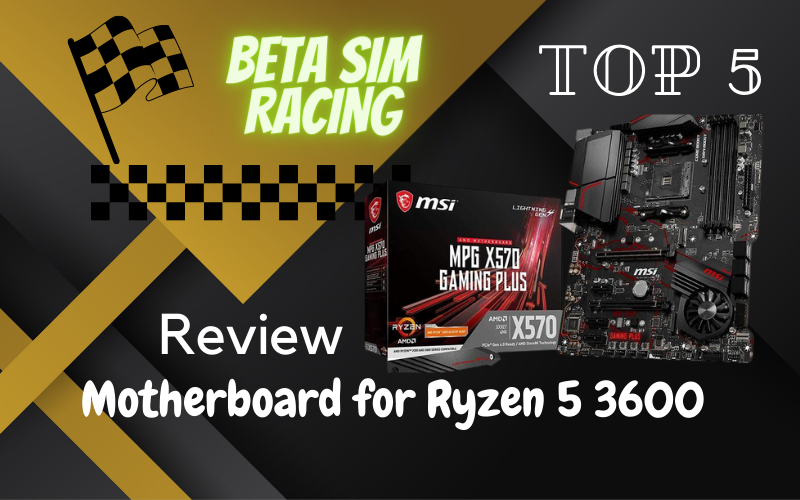
The Ryzen 5 3600 utilizes the AM4 socket, which is compatible with several chipset generations, primarily the B450, X470, B550, and X570. While older B450 boards can be a budget-friendly option, many are now discontinued. B550 and X570 boards are more modern, offering key features like PCIe 4.0 support, which is beneficial for the latest high-speed SSDs and graphics cards. For those building a system today, a B550 motherboard generally strikes the ideal balance between features, performance, and cost. If you are ever unsure when you should upgrade your motherboard, consider the feature set you require for your current and future components.
Comparison of Top Motherboards for Ryzen 5 3600
This table provides a high-level overview of the key specifications for each motherboard. Note that some older models may be discontinued and only available on the used market.
| Motherboard Model | Chipset | Form Factor | VRM Phases | Memory Support (Max) | PCIe x16 Slot | M.2 Slots | Networking |
| MSI MAG B550 TOMAHAWK | AMD B550 | ATX | 10+2+1 | DDR4 5100MHz | 1x Gen4, 1x Gen3 | 1x Gen4, 1x Gen3 | 2.5Gb + 1Gb LAN |
| MSI MPG X570 GAMING PLUS | AMD X570 | ATX | 8+2 | DDR4 4400MHz | 1x Gen4, 1x Gen3 | 1x Gen4, 1x Gen3 | 1Gb LAN |
| ASUS ROG Strix X570-E | AMD X570 | ATX | 12+4 | DDR4 4400MHz | 2x Gen4 | 2x Gen4 | 2.5Gb LAN, Wi-Fi 6 |
| GIGABYTE B450 AORUS ELITE | AMD B450 | ATX | 8+2 | DDR4 3600MHz | 1x Gen3 | 2x Gen3 | 1Gb LAN |
| GIGABYTE X570 AORUS Elite | AMD X570 | ATX | 12+2 | DDR4 4000MHz | 1x Gen4 | 2x Gen4 | 1Gb LAN |
| ASUS TUF Gaming X570-PRO | AMD X570 | ATX | 12+2 | DDR4 4400MHz | 1x Gen4 | 2x Gen4 | 2.5Gb LAN, Wi-Fi 6 |
| MSI MAG X570 TOMAHAWK WIFI | AMD X570 | ATX | 12+2+1 | DDR4 4600MHz | 1x Gen4, 1x Gen3 | 2x Gen4 | 2.5Gb LAN, Wi-Fi 6 |
| MSI MEG X570 ACE | AMD X570 | ATX | 12+2 | DDR4 4600MHz | 3x Gen4 | 3x Gen4 | 2.5Gb + 1Gb LAN, Wi-Fi 6 |
| ASRock B550M PRO4 | AMD B550 | Micro-ATX | 8 | DDR4 4733MHz | 1x Gen4, 1x Gen3 | 1x Gen4, 1x Gen3 | 1Gb LAN |
| ASRock B550 Taichi | AMD B550 | ATX | 16 | DDR4 5200MHz | 1x Gen4, 2x Gen3 | 1x Gen4, 1x Gen3 | 2.5Gb LAN, Wi-Fi 6 |
Detailed Analysis of 10 Compatible Motherboards for Ryzen 5 3600
Below is a detailed breakdown of each motherboard, focusing on its features and current relevance for a build centered around the Ryzen 5 3600.
1. MSI MAG B550 TOMAHAWK
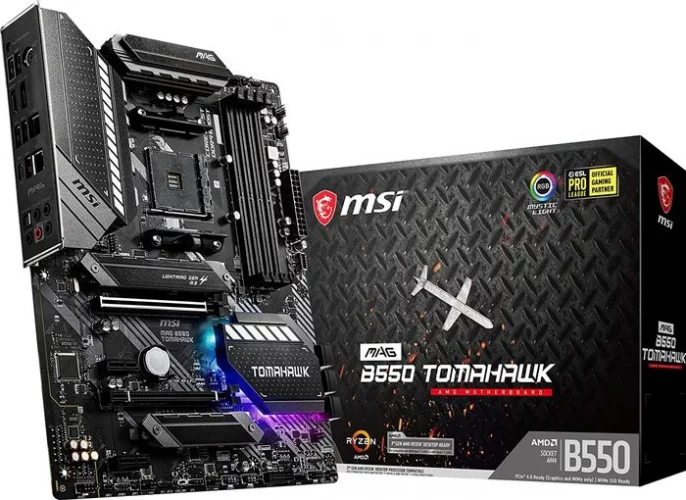
Key Specifications
- Chipset: AMD B550
- Form Factor: ATX
- Power Delivery: 10+2+1 Duet Rail Power System
- Memory: 4x DIMM, up to 128GB DDR4-5100MHz (OC)
- PCIe Slots: 1x PCIe 4.0 x16, 1x PCIe 3.0 x16 (x4 mode)
- Storage: 1x M.2 Gen4 x4, 1x M.2 Gen3 x4, 6x SATA 6Gb/s
- Networking: Realtek 2.5Gb LAN, Realtek 1Gb LAN
- Audio: Realtek ALC1200 Codec
Performance Analysis (2025)
The MSI MAG B550 TOMAHAWK remains one of the most well-regarded and balanced motherboards for the Ryzen 5 3600. Its robust 10+2+1 power delivery system is more than capable of handling the 3600 even with moderate overclocking. The inclusion of a PCIe 4.0 slot and a Gen4 M.2 slot makes it forward-compatible with the best GPU for Ryzen 5 3600 and high-speed NVMe SSDs. With dual LAN ports, including a fast 2.5GbE option, it provides excellent networking flexibility. Given its continued availability and strong feature set, the B550 Tomahawk is an exceptional choice for new builds.
2. MSI MPG X570 GAMING PLUS
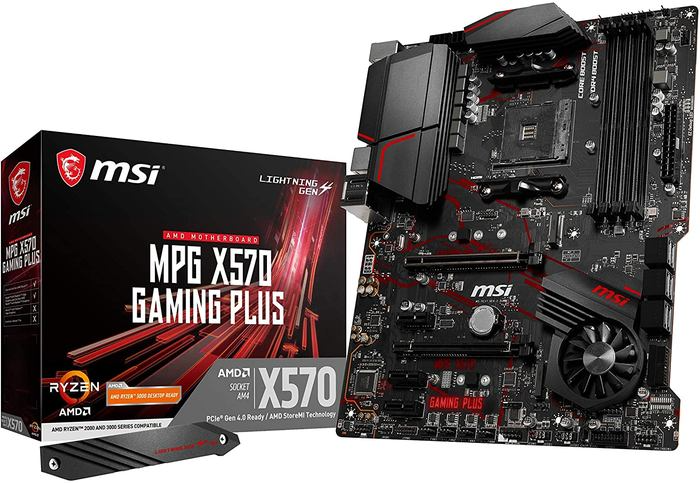
Key Specifications
- Chipset: AMD X570
- Form Factor: ATX
- Power Delivery: 8+2 phase PWM
- Memory: 4x DIMM, up to 128GB DDR4-4400MHz (OC)
- PCIe Slots: 1x PCIe 4.0 x16, 1x PCIe 4.0 x16 (x4 mode)
- Storage: 1x M.2 Gen4 x4, 1x M.2 Gen3 x4, 6x SATA 6Gb/s
- Networking: Realtek RTL8111H 1Gb LAN
- Audio: Realtek ALC1220 Codec
Performance Analysis (2025)
The MSI MPG X570 GAMING PLUS was an entry-level X570 board that offered a gateway into the PCIe 4.0 ecosystem. While its specifications are solid, its 8+2 phase VRM is less robust than newer B550 counterparts in the same price category. The most notable drawback is its basic 1Gb LAN port.
Status Update: This model has been largely superseded by newer B550 boards and MSI’s own revised X570S lineup. It is considered discontinued, and finding it new is unlikely. A modern B550 board like the MSI B550-A PRO or Gigabyte B550 GAMING X V2 would be a more sensible and available alternative.
3. ASUS ROG Strix X570-E Gaming
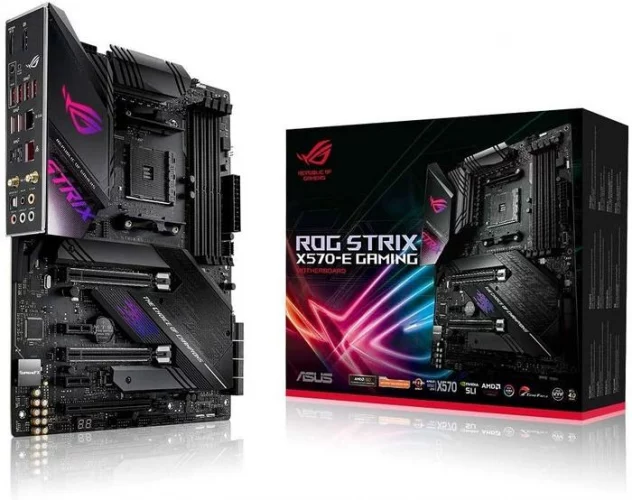
Key Specifications
- Chipset: AMD X570
- Form Factor: ATX
- Power Delivery: 12+4 Power Stages
- Memory: 4x DIMM, up to 128GB DDR4-4400MHz (OC)
- PCIe Slots: 2x PCIe 4.0 x16 (x16 or dual x8)
- Storage: 2x M.2 Gen4 x4, 8x SATA 6Gb/s
- Networking: Realtek 2.5Gb LAN, Intel I211-AT 1Gb LAN, Intel Wi-Fi 6 AX200
- Audio: SupremeFX S1220A Codec
Performance Analysis (2025)
The ASUS ROG Strix X570-E Gaming was a premium motherboard with a feature set that was arguably overkill for a Ryzen 5 3600. Its powerful 12+4 VRM, dual PCIe 4.0 x16 slots for SLI/CrossFire, and high-end networking with Wi-Fi 6 made it a board for enthusiasts. The build quality and aesthetics are top-tier, typical of the ROG Strix line. For a deeper dive into chipset differences, exploring a B550 vs X570 comparison can be very insightful.
Status Update: The ROG Strix X570-E is discontinued. It was replaced by the fanless X570S version and subsequently by newer AM5 models. For a user seeking a high-end experience with a Ryzen 5 3600 today, the ASRock B550 Taichi or ASUS ROG Strix B550-F Gaming would offer similar premium features at a better value.
4. GIGABYTE B450 AORUS ELITE
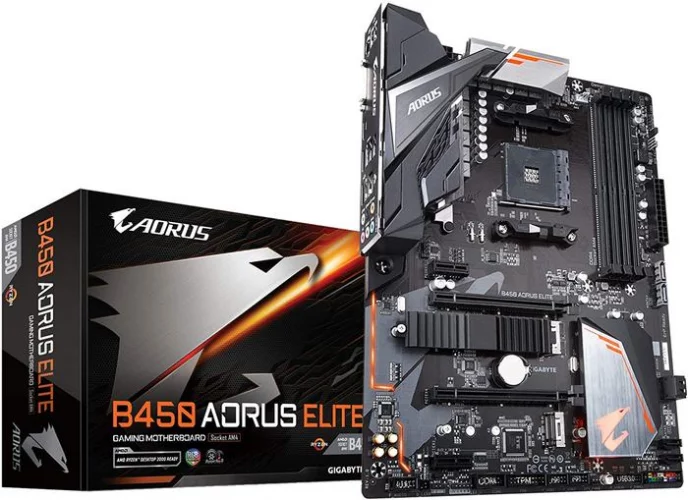
Key Specifications
- Chipset: AMD B450
- Form Factor: ATX
- Power Delivery: 8+2 phase Hybrid Digital PWM
- Memory: 4x DIMM, up to 128GB DDR4-3600MHz (OC)
- PCIe Slots: 1x PCIe 3.0 x16
- Storage: 2x M.2 Gen3 (x4, x2), 6x SATA 6Gb/s
- Networking: Realtek 1Gb LAN
- Audio: Realtek ALC892 Codec
Performance Analysis (2025)
The Gigabyte B450 AORUS ELITE was a very popular budget-to-mid-range motherboard during its prime. It offered a reliable platform for the Ryzen 5 3600, with a decent VRM for stock operation and mild overclocking. However, its technology is now dated. It lacks PCIe 4.0, has slower M.2 connections compared to modern boards, and features a basic networking and audio setup. Knowing how to update motherboard BIOS is often necessary when pairing this board with a 3000-series Ryzen CPU.
Status Update: This motherboard is discontinued. While available on the second-hand market, purchasing a new entry-level B550 motherboard like the ASRock B550M PRO4 is a much better investment. It offers superior features, including PCIe 4.0 support, for a comparable price.
5. GIGABYTE X570 AORUS Elite
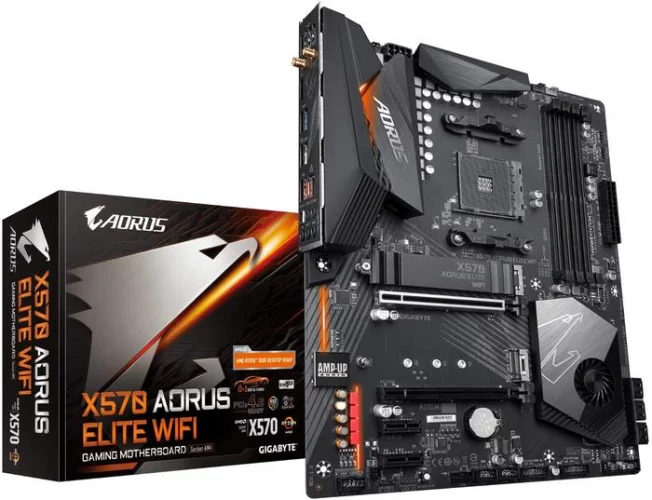
Key Specifications
- Chipset: AMD X570
- Form Factor: ATX
- Power Delivery: 12+2 Phases Digital VRM
- Memory: 4x DIMM, up to 128GB DDR4-4000MHz (OC)
- PCIe Slots: 1x PCIe 4.0 x16
- Storage: 2x M.2 Gen4 x4, 6x SATA 6Gb/s
- Networking: Intel 1Gb LAN
- Audio: Realtek ALC1200 Codec
Performance Analysis (2025)
The X570 AORUS Elite was a standout mid-range board, offering a very strong 12+2 phase VRM that could handle much more powerful CPUs than the Ryzen 5 3600. It provided dual PCIe 4.0 M.2 slots and excellent thermal solutions, including an active chipset fan. Its primary weakness was the standard 1Gb LAN, which felt underwhelming for an otherwise premium board.
Status Update: The original X570 AORUS Elite is largely discontinued, with remaining stock being cleared out. Its successor, the Gigabyte X570S AORUS Elite AX, offers similar features with a fanless chipset heatsink and Wi-Fi 6. However, for a Ryzen 5 3600 build, the Gigabyte B550 AORUS Elite AX V2 offers a better value proposition with comparable VRMs and modern connectivity.
6. ASUS TUF Gaming X570-PRO (Wi-Fi)
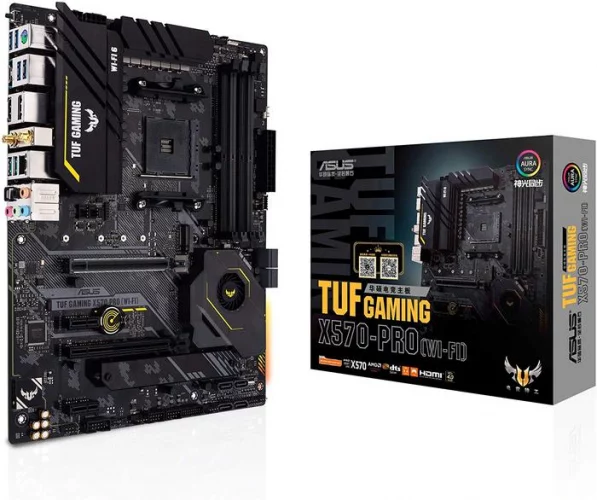
Key Specifications
- Chipset: AMD X570
- Form Factor: ATX
- Power Delivery: 12+2 DrMOS Power Stages
- Memory: 4x DIMM, up to 128GB DDR4-4400MHz (OC)
- PCIe Slots: 1x PCIe 4.0 x16
- Storage: 2x M.2 Gen4 x4, 8x SATA 6Gb/s
- Networking: Intel 2.5Gb LAN, Intel Wi-Fi 6 AX200
- Audio: Realtek S1200A Codec
Performance Analysis (2025)
The ASUS TUF Gaming X570-PRO (Wi-Fi) improved upon earlier TUF models with a more robust VRM, better cooling, and superior connectivity. The 12+2 power stages, 2.5Gb LAN, and Wi-Fi 6 made it a very well-rounded and durable option. It’s a fantastic pairing for a Ryzen 5 3600, providing stability and a feature set that ensures the PC feels modern and responsive. The decision to invest in a board like this often comes down to whether you need a good motherboard for gaming.
Status Update: This model is now limited in availability or discontinued in favor of newer product lines. The ASUS TUF Gaming B550-PLUS WIFI II is its modern equivalent for the AM4 socket, offering a nearly identical feature set (2.5Gb LAN, Wi-Fi 6) at a more attractive price point for a Ryzen 5 3600 build.
7. MSI MAG X570 TOMAHAWK WIFI
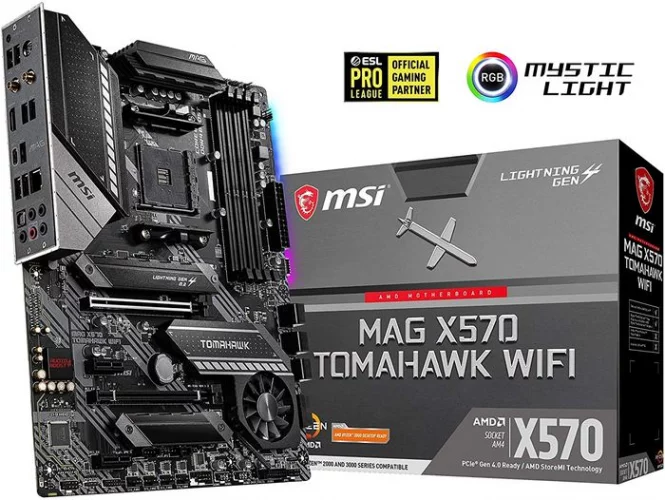
Key Specifications
- Chipset: AMD X570
- Form Factor: ATX
- Power Delivery: 12+2+1 Duet Rail Power System
- Memory: 4x DIMM, up to 128GB DDR4-4600MHz (OC)
- PCIe Slots: 1x PCIe 4.0 x16, 1x PCIe 4.0 x16 (x4 mode)
- Storage: 2x M.2 Gen4 x4, 6x SATA 6Gb/s
- Networking: Realtek 2.5Gb LAN, Intel Wi-Fi 6 AX200
- Audio: Realtek ALC1200 Codec
Performance Analysis (2025)
Released later in the X570 lifecycle, the MSI MAG X570 TOMAHAWK WIFI was praised for addressing the shortcomings of early mid-range X570 boards. It features a powerful VRM, excellent cooling, and a modern connectivity suite including 2.5Gb LAN and Wi-Fi 6. It was one of the best overall X570 boards for its price, providing a premium experience without the enthusiast-level price tag.
Status Update: Finding this model is difficult as it has been phased out. It set a high standard that is now met by top-tier B550 boards. The MSI MAG B550 Tomahawk MAX WiFi is the direct successor in spirit, offering a very similar feature set on the more power-efficient B550 chipset.
8. MSI MEG X570 ACE
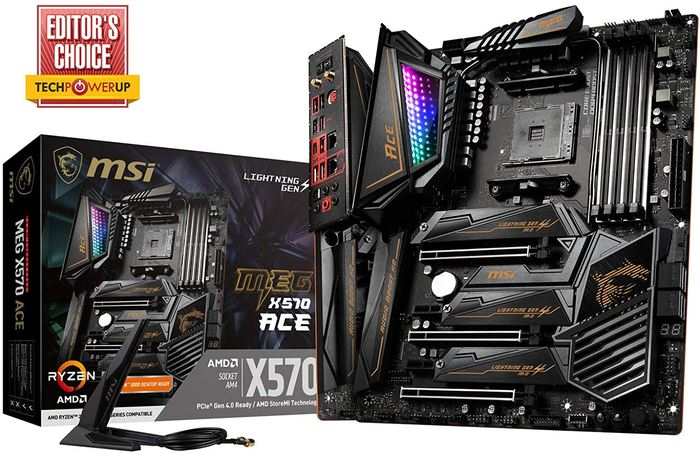
Key Specifications
- Chipset: AMD X570
- Form Factor: ATX
- Power Delivery: 12+2 Phase IR Digital PWM
- Memory: 4x DIMM, up to 128GB DDR4-4600MHz (OC)
- PCIe Slots: 3x PCIe 4.0 x16 (x16, x8/x8, x8/x8/x4)
- Storage: 3x M.2 Gen4 x4, 4x SATA 6Gb/s
- Networking: Realtek 2.5Gb LAN, Intel 1Gb LAN, Intel Wi-Fi 6 AX200
- Audio: Realtek ALC1220 Codec + ESS SABRE9018 DAC
Performance Analysis (2025)
The MSI MEG X570 ACE is a high-end enthusiast motherboard designed for top-tier Ryzen processors. For a Ryzen 5 3600, its capabilities are excessive. Features like three PCIe 4.0 slots, triple M.2 slots with extensive cooling, and a premium audio DAC are aimed at users pushing the limits with CPUs like the Ryzen 9 series. The build quality, aesthetics with Mystic Light Infinity, and overclocking features are exceptional but come at a significant cost.
Status Update: The MEG X570 ACE is discontinued. It was a flagship product for its time, and its price, even on the used market, may not be justifiable for a Ryzen 5 3600 build. A user wanting premium features would be better served by the ASRock B550 Taichi.
9. ASRock B550M PRO4
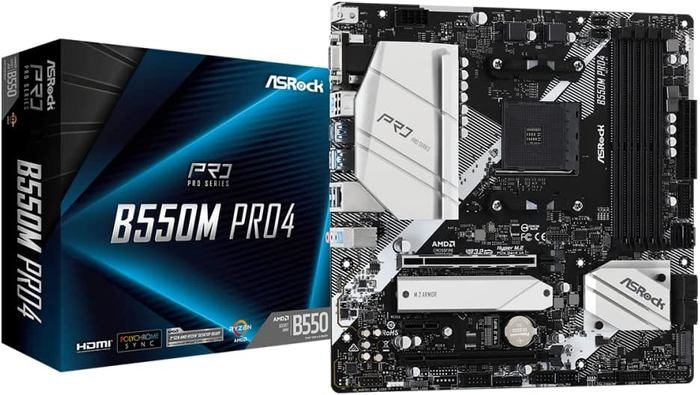
Key Specifications
- Chipset: AMD B550
- Form Factor: Micro-ATX
- Power Delivery: 8 Power Phase Design
- Memory: 4x DIMM, up to 128GB DDR4-4733MHz (OC)
- PCIe Slots: 1x PCIe 4.0 x16, 1x PCIe 3.0 x16 (x4 mode)
- Storage: 1x M.2 Gen4 x4, 1x M.2 Gen3 x2/SATA, 4x SATA 6Gb/s
- Networking: Realtek 1Gb LAN
- Audio: Realtek ALC1200 Codec
Performance Analysis (2025)
The ASRock B550M PRO4 is an excellent budget-friendly choice that doesn’t compromise on core features. Despite its lower price and smaller Micro-ATX vs Mini-ITX vs ATX form factor, it includes a robust 8-phase power design, a PCIe 4.0 slot for the GPU, and a Gen4 M.2 slot for a fast SSD. It even features the solid Realtek ALC1200 audio codec, often found on more expensive boards. Its primary limitation is the 1Gb LAN port, but for most users, this is perfectly adequate. It delivers outstanding value for a Ryzen 5 3600 system.
10. ASRock B550 Taichi
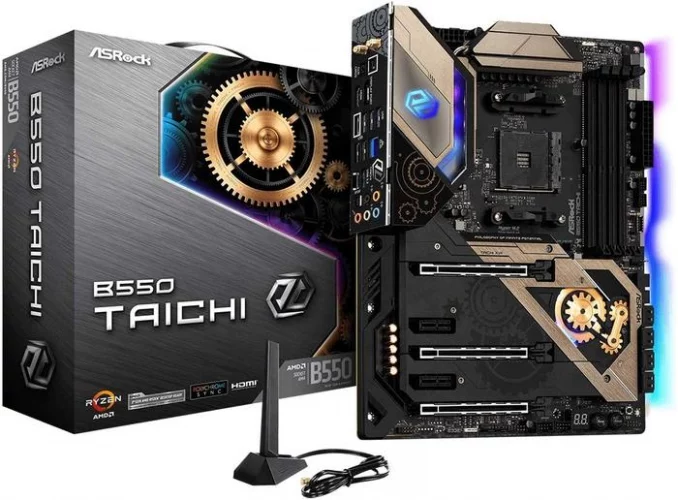
Key Specifications
- Chipset: AMD B550
- Form Factor: ATX
- Power Delivery: 16 Power Phase Design
- Memory: 4x DIMM, up to 128GB DDR4-5200MHz (OC)
- PCIe Slots: 1x PCIe 4.0 x16, 2x PCIe 3.0 x16 (x4, x1)
- Storage: 1x M.2 Gen4 x4, 1x M.2 Gen3 x4, 8x SATA 6Gb/s
- Networking: Intel 2.5Gb LAN, Intel Wi-Fi 6 AX200
- Audio: Realtek ALC1220 Codec + ESS SABRE9218 DAC
Performance Analysis (2025)
The ASRock B550 Taichi represents the pinnacle of the B550 chipset, packing features that rival and even exceed many X570 boards. Its massive 16-phase VRM is among the best on any AM4 motherboard, providing incredible power stability. The inclusion of premium audio, 2.5Gb LAN, Wi-Fi 6, and its distinctive clockwork aesthetic make it a high-end choice. While it’s more than a Ryzen 5 3600 needs, it provides an unparalleled foundation and a clear upgrade path to a more powerful CPU like a Ryzen 9 5900X in the future.
Buyer’s Guide: How to Choose the Right Motherboard for Your Ryzen 5 3600
Selecting a motherboard involves more than just picking one from a list. Understanding these key features will help you make a well-informed choice tailored to your needs.
Chipset: B550 vs. X570 vs. B450
- B550 (Recommended): This chipset offers the best balance for the Ryzen 5 3600. It provides a direct PCIe 4.0 x16 link from the CPU for your graphics card and a PCIe 4.0 x4 link for a primary NVMe SSD. The links from the chipset itself are PCIe 3.0, which is ample for most other devices.
- X570: This was the original high-end chipset for Zen 2. It provides PCIe 4.0 connectivity for both the CPU-linked slots and the general-purpose lanes from the chipset. This is useful for running multiple Gen4 SSDs at full speed but is generally unnecessary for a typical Ryzen 5 3600 build and required active cooling on early models.
- B450: An older, budget-oriented chipset that only supports PCIe 3.0. While functional, many B450 boards are discontinued, and modern B550 boards offer better features for a similar price.
Form Factor: ATX, Micro-ATX, and Mini-ITX
The physical size of the motherboard determines case compatibility and the number of expansion slots.
- ATX: The standard, full-size motherboard. Offers the most PCIe slots, M.2 slots, and connectivity.
- Micro-ATX (mATX): A shorter board that fits in more compact cases. It has fewer PCIe slots but is often more affordable. The ASRock B550M PRO4 is a prime example.
- Mini-ITX: The smallest form factor, designed for tiny PCs. It typically has only one PCIe slot and limited storage options.
Power Delivery (VRM)
The Voltage Regulator Module (VRM) converts the 12V power from your PSU into the precise low voltage your CPU needs. A more robust VRM (indicated by a higher number of “phases,” e.g., 12+2) delivers cleaner, more stable power. For a Ryzen 5 3600, a quality 6-phase VRM is sufficient, but boards with 8 or more phases will run cooler and provide more headroom for potential future CPU upgrades.
Memory Support (RAM)
All boards on this list use DDR4 memory. Key factors are the maximum supported speed (e.g., 4400MHz) and capacity (usually 128GB). For the Ryzen 5 3600, the “sweet spot” for performance is generally considered to be dual-channel RAM running between 3200MHz and 3600MHz.
Expansion and Storage (PCIe and M.2 Slots)
Consider how many PCIe slots you need. Most users only need one PCIe x16 slot for their graphics card. M.2 slots are for high-speed NVMe SSDs. A board with at least one PCIe 4.0 M.2 slot is highly recommended to take advantage of modern storage speeds. Also, check the number of SATA ports for connecting traditional hard drives and 2.5-inch SSDs.
Connectivity: Networking and I/O
The rear Input/Output (I/O) panel is where you’ll connect your peripherals.
- USB: Ensure there are enough USB ports for your devices. Look for a mix of USB 2.0, 3.2 Gen 1 (5Gbps), and 3.2 Gen 2 (10Gbps) ports. A USB Type-C port is also a valuable modern feature. Learning about what are USB headers can also help with front-panel connectivity.
- Networking: A 1Gb LAN port is standard. However, many modern boards now include faster 2.5Gb LAN, which is beneficial for fast home networks and large file transfers.
- Wi-Fi: If you can’t run an Ethernet cable, a motherboard with built-in Wi-Fi is essential. Look for Wi-Fi 6 (802.11ax) for the best performance and future-proofing.
Frequently Asked Questions (FAQ)
Is the Ryzen 5 3600 still a good CPU?
Yes, the Ryzen 5 3600 remains a very competent processor for 1080p and 1440p gaming, as well as general productivity. It offers excellent value and can be the foundation of a powerful, budget-conscious PC.
Do I need to update the BIOS for a Ryzen 5 3600?
If you purchase a B550 or X570 motherboard, it will work with the Ryzen 5 3600 out of the box. If you acquire an older B450 motherboard, it may require a BIOS update to be compatible. Many motherboards feature a “BIOS Flashback” function that allows you to update the BIOS without a CPU installed.
What is the main difference between B550 and X570 motherboards?
The primary difference is the extent of PCIe 4.0 support. B550 provides PCIe 4.0 for the main graphics card slot and one M.2 slot directly from the CPU. X570 extends PCIe 4.0 support to the other general-purpose lanes managed by the chipset, which is useful for multiple high-speed devices.
Can I use a B450 motherboard with a Ryzen 5 3600?
Yes, you can, provided the B450 motherboard has the correct BIOS version installed. However, you will be limited to PCIe 3.0 speeds for your graphics card and SSDs. Buying a new B550 board is generally the more logical and feature-rich option.
How many M.2 slots are sufficient for a gaming PC?
For most gaming PCs, two M.2 slots are ideal: one for a high-speed NVMe SSD for the operating system and key applications, and a second for your game library. Understanding how many M.2 slots are on a motherboard before you buy is crucial for planning your storage.
Is built-in Wi-Fi on a motherboard necessary?
This depends entirely on your setup. If your PC will be located far from your router and running an Ethernet cable is impractical, then built-in Wi-Fi is a significant convenience. If you can use a wired connection, you can opt for a board without Wi-Fi to potentially save money.

Holding a Ph.D. in Computer Science, Dr. Alistair Finch is our chief PC Component Benchmark Analyst. He provides meticulous, data-driven analysis of CPUs and GPUs, moving beyond marketing claims to reveal their true performance. His guides help readers understand the intricate relationship between hardware architecture and real-world gaming frame rates.