
Reclaim Your Desk and Banish Eye Strain
Think of your desk lighting. If you’re using a traditional desk lamp, it’s like using a giant floodlight in a small room. It casts light everywhere, creating harsh shadows and, most annoyingly, a painful glare on your monitor screen. This leads to eye strain, headaches, and fatigue, especially during long work or gaming sessions.
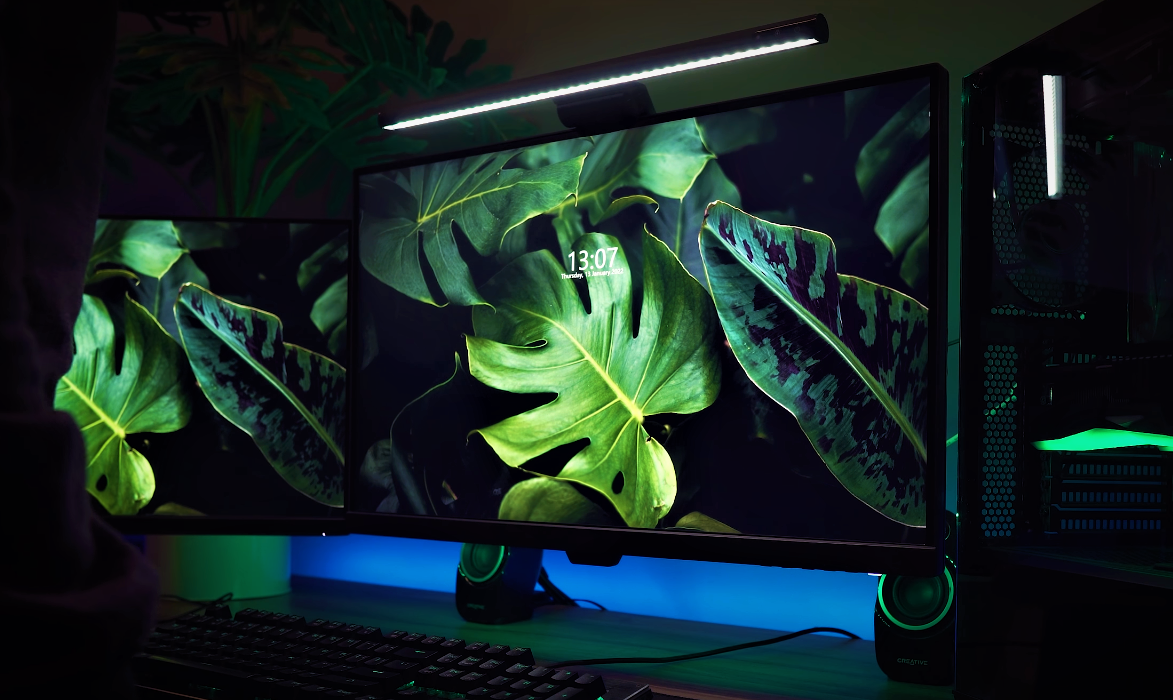
A monitor light bar is the solution. It’s the equivalent of a perfectly aimed spotlight in a theater—it illuminates the stage (your keyboard and desk) with precise, controlled light, without ever shining in your eyes or reflecting off the screen.
If you spend hours at your computer for work, study, design, or play, a monitor light bar isn’t just an accessory; it’s an essential upgrade for your health and productivity. It declutters your desk, eliminates screen glare, and provides customizable, flicker-free light that helps you stay focused and comfortable.
Our Top Monitor Light Bar Picks at a Glance
To help you make a quick decision, here’s a side-by-side comparison of the top models we’ve reviewed. Each one excels in different areas, from budget-friendliness to premium features.
| Product | Key Feature | Color Temperature | Power Source | Best For |
| Quntis Monitor Lamp | Excellent value for the price | 3000K – 6500K | Corded Electric (USB) | Budget-conscious users and standard setups |
| BenQ ScreenBar | Auto-dimming ambient light sensor | 2700K – 6500K (Dial) | Corded Electric (USB) | Premium performance and build quality |
| Ksunun Double Head Lamp | Ultra-wide 31.5-inch gooseneck | 3200K – 6500K | Corded Electric (AC) | Dual monitors and very large desks |
| LYMAX Wide Light Bar | Wireless remote control | 2900K – 6000K | Corded Electric (USB-C) | Ultimate convenience and wide desks |
| HumanCentric Lighting | Webcam-style mount for video | Adjustable | Corded Electric (USB-A/C) | Video conferencing, streaming, and content creation |
In-Depth Reviews of the 5 Best Monitor Light Bars
We’ve tested and analyzed the top options on the market to give you a detailed breakdown of their performance, features, and ideal use cases.
1. Quntis Computer Monitor Lamp: Best Budget-Friendly Option
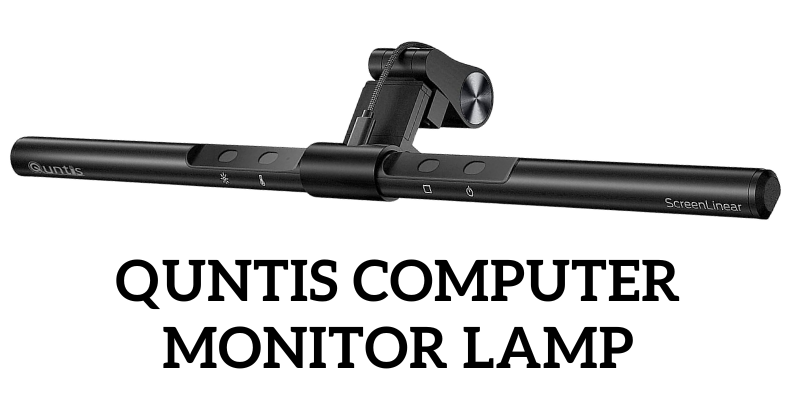
Specifications:
- Dimensions: 0.78″D x 15.7″W x 0.78″H
- Special Feature: Adjustable Color Temperature, Dimmable, Auto-Dimming Sensor
- Power Source: Corded Electric (USB)
- Material: Aluminum Alloy, PC+ABS
- Color Temperature: 3000K – 6500K
The Quntis Computer Monitor Lamp proves that you don’t need to spend a fortune to get high-quality, eye-caring light. Its core strength lies in its asymmetrical optical design, which directs light downwards onto your desk without creating any reflective glare on your screen. This is a critical feature that significantly reduces eye fatigue.
This model is a fantastic choice for students, designers, and office workers. It features an ultra-high Color Rendering Index (CRI) of over 95, ensuring that colors on your desk appear natural and true-to-life.
Control is handled via sensitive touch buttons on the bar itself, allowing you to cycle through color temperatures (from a warm 3000K for relaxing to a cool 6500K for focused work) and adjust brightness. It also includes an auto-dimming mode that uses a built-in ambient light sensor to adjust brightness automatically—a feature often found on more expensive models.
Installation is simple. The weighted clip mount rests securely on top of most monitors (15-22 inches, 0.6 to 1.4 inches thick) without any screws or adhesives.
Benefits:
- Excellent value, offering premium features at a budget price.
- Flicker-free, anti-blue light technology protects your eyes.
- High CRI95+ for accurate color representation.
- Built-in ambient light sensor for automatic brightness adjustment.
- Sleek, space-saving design.
Drawback:
- The clip design is not recommended for curved or irregular-shaped monitors.
2. BenQ ScreenBar Monitor Light: The Premium Industry Standard
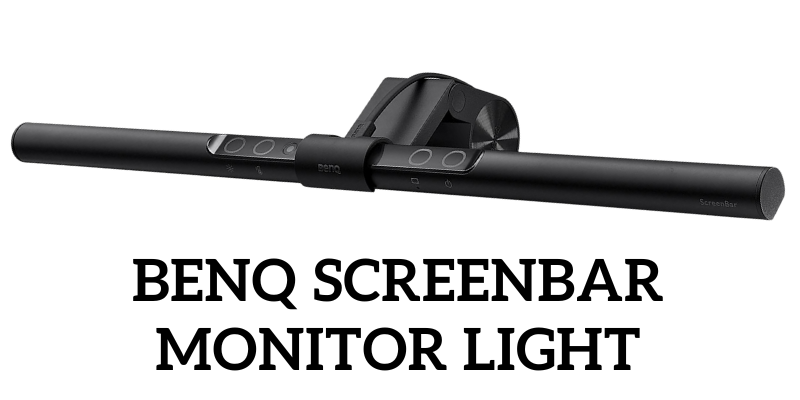
Specifications:
- Dimensions: 4″D x 18″W x 4″H
- Special Feature: Auto-Dimming, Hue Adjustment, Patented Clip
- Power Source: Corded Electric (USB)
- Material: Aluminum, Polycarbonate
- Color Temperature: Adjustable
The BenQ ScreenBar is the product that popularized the monitor light bar, and it remains the gold standard for a reason. Its build quality, lighting precision, and user-centric features are second to none. The patented clip design is a feat of engineering, attaching to your monitor instantly and securely without any screws, balancing perfectly under its own weight.
The asymmetrical optical design illuminates a wide 90-degree area of your desk, providing 500 lux of even, glare-free light right where you need it. This is perfect for maintaining focus, whether you’re deep in a spreadsheet or navigating dark environments in a game. For anyone serious about their desk setup, from professionals to gamers, the BenQ ScreenBar is a worthy investment. It’s a key part of creating an ergonomic workspace, especially if you’re using a color-accurate monitor where external glare can distort your perception.
Its built-in ambient light sensor intelligently adjusts the brightness to the recommended level for your environment. You also have full manual control over both brightness and color temperature, allowing you to switch from a cool, focus-enhancing light to a warm, relaxing glow with ease.
Benefits:
- Superior build quality and a stable, non-invasive mounting clip.
- Complies with IEEE PAR1789 standard for flicker-free lighting.
- Intelligent auto-dimming and color temperature adjustment.
- Zero screen glare, enhancing immersion and reducing eye strain.
- Saves 100% of your desk space compared to a traditional lamp.
Drawback:
- Carries a premium price tag.
3. Ksunun Double Head LED Desk Lamp: Best for Large & Dual-Monitor Setups
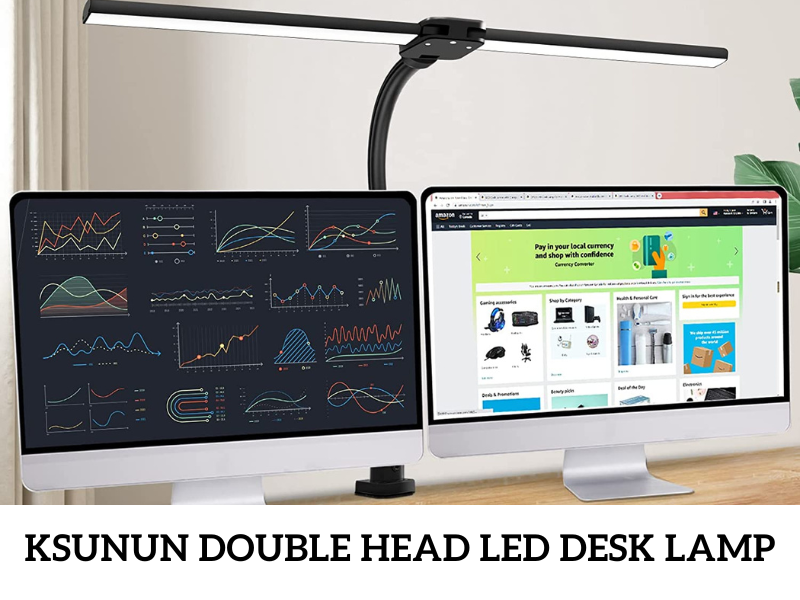
Specifications:
- Dimensions: 31.5″D x 3.9″W x 32.7″H
- Special Feature: Ultra-wide 31.5″ span, 5 color modes, 5 brightness levels, Flexible Gooseneck
- Power Source: Corded Electric (AC Adapter)
- Material: Aluminum Alloy, ABS
- Color Temperature: 3200K – 6500K
While not a traditional monitor-mounted bar, the Ksunun Double Head LED Desk Lamp is the ultimate solution for users with expansive workspaces, particularly those using dual-monitor stands or a Thunderbolt monitor setup. Its innovative double-head design provides a massive 31.5-inch span of light, easily illuminating your entire desk from edge to edge.
The lamp attaches via a sturdy desk clamp and features a flexible silicone gooseneck, allowing you to position the light source perfectly. This 24W lamp is incredibly bright and versatile, with 5 distinct color temperature modes and 5 dimming levels, all controlled via a touch panel. The memory function is a nice touch, remembering your last settings when you power it on.
It’s an ideal choice for architects, artists, crafters, and anyone who needs powerful, customizable lighting across a large surface area.
Benefits:
- Exceptional width and brightness for large and multi-monitor setups.
- Highly flexible gooseneck for perfect positioning.
- Multiple color and brightness modes to suit any task.
- Sturdy clamp-on design saves desk space.
- Memory function adds convenience.
Drawback:
- The flexible gooseneck needs to be adjusted with care to maintain its position over time.
4. LYMAX Wide Computer Monitor Light Bar: Best Wireless Control
Specifications:
- Dimensions: 21.4″D x 5.67″W x 2.6″H
- Special Feature: Wireless remote control, Curved bar design, USB-C powered
- Power Source: Corded Electric (USB-C)
- Color Temperature: 2900K – 6000K
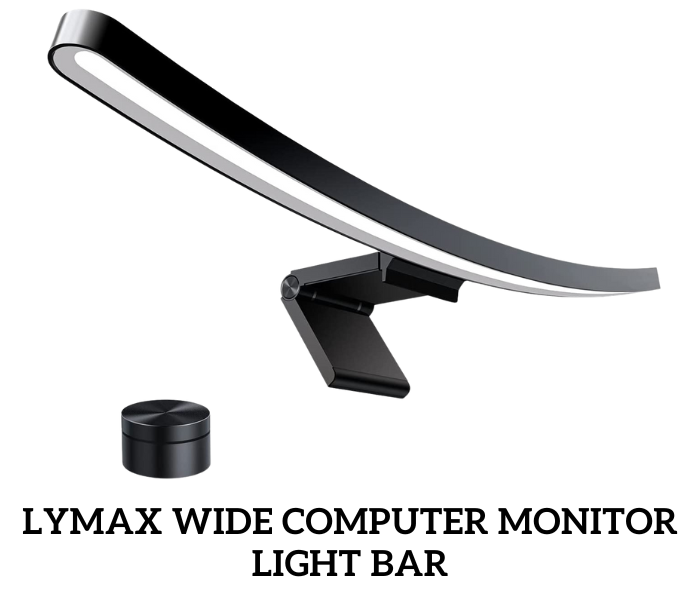
The LYMAX Wide Monitor Light Bar stands out with two major features: its extra-wide, curved design and its elegant wireless remote control. The 45-degree asymmetrical light angle ensures zero screen glare, while the curved bar provides an exceptionally wide lighting area of nearly 50 inches, making it a great option for larger or even some ultrawide monitors.
The real star is the wireless remote. This small, sleek puck sits on your desk and allows you to control everything with a simple rotation or press. You can turn the light on/off, rotate to adjust brightness, or press and hold to cycle through color temperatures. This removes the need to reach up to the light bar itself, adding a layer of convenience that you quickly come to appreciate.
It mounts securely using a gravity damper bracket, fitting monitors from 0.2 to 1.5 inches thick. Powered by a modern USB-C port, it’s a stylish and highly functional addition to any home office.
Benefits:
- Convenient and stylish wireless remote control.
- The curved design provides an extra-wide illumination area.
- Three auto-dimming modes for reading, relaxation, and entertainment.
- Stable gravity clamp with non-slip silicone padding.
- Modern USB-C power connection.
Drawback:
- The package does not include a USB power adapter.
HumanCentric Video Conference Lighting: Best for Streamers & Professionals
Specifications:
- Dimensions: 15.7″L x 0.78″W
- Special Feature: Webcam-style mount, Expandable design, In-line controller
- Power Source: Corded Electric (USB-A & USB-C adapter)
- Controls: Via in-line controller
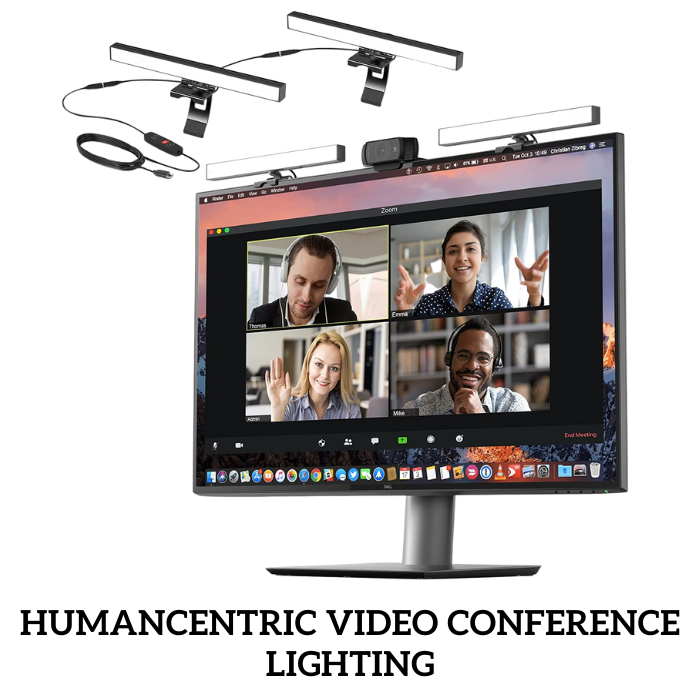
While most light bars focus on illuminating your desk, the HumanCentric Video Conference Lighting is designed to illuminate you. This makes it the perfect tool for anyone who spends their day in virtual meetings, streaming, or recording video. A well-lit face improves engagement and gives you a more professional and natural appearance.
Instead of a gravity clip, it uses a webcam-style stand that is incredibly easy to set up and remove from any laptop or monitor. The light itself has a pre-installed diffuser that softens the output, preventing harsh shadows and providing a pleasant glow.
The system is modular; you can start with a single light and expand with add-on units for larger screens or more comprehensive lighting. Brightness and color temperature are fully adjustable via the in-line remote. If you want to look your best on camera without setting up complex ring lights, this is the most streamlined and effective solution.
Benefits:
- Specifically designed to improve your on-camera appearance.
- Soft, diffused light for a more natural and professional look.
- Extremely easy to set up and remove with its webcam-style mount.
- Expandable with add-on lights for more coverage.
- Ideal for Zoom calls, streaming, and online classes.
Drawback:
- The in-line controller feels less premium than the light bar itself.
The Ultimate Buyer’s Guide: How to Choose the Perfect Monitor Light Bar
Choosing the right light bar can transform your workspace. Here are the key factors to consider to ensure you get the best one for your specific needs.
Understanding Asymmetrical Lighting: The Core of a Good Light Bar
This is the most critical concept. A good monitor light bar doesn’t just shine light down; it directs it forward and down at a precise angle. This asymmetrical beam illuminates your desk and keyboard without any of the light hitting your screen. The result? Zero screen glare. This single feature is the primary reason light bars are so effective at reducing eye strain.
Brightness and Color Temperature (Kelvin)
- Brightness (Lumens/Lux): Most light bars provide ample brightness (around 500 lux) for a typical desk. The key is having adjustable dimming levels to match your ambient room light and personal preference.
- Color Temperature (K): This refers to how “warm” or “cool” the light appears.
- Warm Light (2700K-3500K): A cozy, yellowish light, great for relaxing, casual Browse, or late-night work.
- Cool Light (5000K-6500K): A crisp, blue-white light that mimics daylight, ideal for enhancing focus, concentration, and detailed tasks. The best monitor light bars offer a wide range of adjustable color temperatures.
Mounting System & Monitor Compatibility (Curved vs. Flat)
Most light bars use a weighted clip or gravity clamp that rests on top of your monitor.
- For Flat Monitors: Most standard clips work perfectly.
- For Curved/Ultrawide Monitors: This is tricky. A standard clip may not sit securely. Look for models specifically designed for curved monitors or consider a desk-clamp lamp like the Ksunun for guaranteed stability. Always check the manufacturer’s recommended monitor thickness (e.g., 0.4″ to 1.2″).
Controls and Power Source
- Controls: These can be touch buttons on the bar, an in-line remote on the cable, or a wireless desktop puck (like the LYMAX). A wireless remote offers the most convenience, but touch controls are sleek and minimalist.
- Power Source: Nearly all monitor light bars are powered via USB. You can plug them into your monitor, a PC USB port, or a separate phone charger. This is convenient, but make sure your monitor’s USB port provides enough power (usually 5V/1A).
Build Quality and Materials
Premium models like the BenQ ScreenBar use anodized aluminum, which looks great and helps dissipate heat. Budget models often use high-quality plastics (like PC+ABS). Both are durable, but metal constructions generally have a more premium feel and longer lifespan.
Color Rendering Index (CRI)
CRI is a scale from 0 to 100 that measures how accurately a light source reveals the true colors of objects. The sun has a CRI of 100. For desk work, especially if it involves design or art, you want a CRI of 90 or higher. A high CRI ensures that the colors you see on your desk are vibrant and accurate, not washed out.
Frequently Asked Questions (FAQ)
Does a monitor light bar really reduce eye strain?
Yes, absolutely. By eliminating reflective glare from your monitor screen and providing focused, flicker-free light, it significantly reduces the primary causes of computer-related eye fatigue and headaches.
Should I get a light bar if I already have a desk lamp?
A monitor light bar is superior to a standard desk lamp for computer work. A regular lamp creates glare on your screen and takes up valuable desk space. A light bar solves both of these problems by mounting on the monitor and using an asymmetrical design.
Can a monitor light bar damage my monitor screen?
No. They are designed with padded, weighted clips that rest gently on the monitor’s bezel (frame). They do not put pressure on the actual screen panel and are perfectly safe for daily use.
Which is better for my eyes, LED or LCD?
This question often refers to the monitor screen itself. Modern displays use LED backlighting, which is more energy-efficient and allows for better features like local dimming. For eye comfort, the key is not just the display type but also having flicker-free technology and the ability to control brightness, which a good quality monitor and light bar will both provide.
Will a monitor light bar work on a curved or ultrawide monitor?
It depends on the model. Standard light bar clips are designed for flat monitors and may not sit securely on a pronounced curve. For these monitors, look for light bars specifically advertised for curved screens, or opt for a flexible, off-monitor solution like the Ksunun Double Head lamp.
Is it better to look down or up at a monitor?
Ergonomically, your gaze should be directed slightly downward. The top edge of your monitor should be at or just below your eye level. A monitor light bar does not interfere with this and helps by properly illuminating your keyboard and desk in this natural viewing position.

With 15 years of experience as a PC hardware technician, Ben brings a practical, hands-on approach to our PC Components section. He specializes in real-world testing and longevity analysis, explaining how components perform over time. His guides help readers understand the practical side of owning and maintaining a gaming PC.