
Choosing the correct PC case is a foundational step in any system build, influencing everything from thermal performance to component compatibility and overall aesthetics. The Micro-ATX (mATX) form factor holds a popular position among builders, offering a compelling balance between the expansive space of a full ATX tower and the compact footprint of a Mini-ITX system. This guide provides a detailed, objective analysis of eight distinct Micro-ATX cases, each with unique design philosophies and features.
Understanding the Micro-ATX Form Factor
The primary advantage of a Micro-ATX build is its efficiency in space and cost. These cases are smaller than their standard ATX counterparts, making them suitable for environments where desk space is a consideration. Correspondingly, mATX motherboards often provide a robust feature set at a more accessible price point than larger or much smaller alternatives. For a deeper dive into how these sizes compare, exploring the differences between Micro-ATX vs. Mini-ITX vs. ATX can provide valuable context.
This analysis will examine each case based on its technical specifications, design, and suitability for different build scenarios, from high-airflow gaming rigs to compact, minimalist workstations.
Comparative Analysis of Leading Micro-ATX Cases
This table offers a direct comparison of the key specifications for each Micro-ATX case reviewed in this guide. This allows for a quick assessment of compatibility and features at a glance.
| Feature | Cooler Master MasterBox Q300L | Lian Li Lancool 205M Mesh | Fractal Design Meshify C Mini | Thermaltake Level 20 VT | Phanteks Evolv mATX TG | MUSETEX G05 Series | Rosewill SCM-01B | ZZAW B3 |
| Motherboard Support | Micro-ATX, Mini-ITX | Micro-ATX, Mini-ITX | Micro-ATX, Mini-ITX | Micro-ATX, Mini-ITX | Micro-ATX, Mini-ITX | Micro-ATX, Mini-ITX | Micro-ATX, Mini-ITX | Micro-ATX, Mini-ITX |
| Dimensions (L×W×H) | 387 x 230 x 381 mm | 400 x 210 x 415 mm | 395 x 212 x 399 mm | 348 x 330 x 430 mm | 395 x 230 x 453 mm | ~415 x 215 x 440 mm | 350 x 180 x 365 mm | 326 x 161 x 275 mm |
| Max GPU Length | 360 mm | 350 mm | 315 mm | 350 mm | 319 mm | 320 mm | 330 mm | Up to 325 mm |
| Max CPU Cooler Height | 159 mm | 160 mm | 172 mm | 185 mm | 192 mm | 160 mm | 140 mm | 138 mm |
| Radiator Support | Front: 240mm | Top/Front: 240mm | Top: 240mm, Front: 280mm | Top/Front: 240mm | Top/Front: 280mm | Front: 240mm | Not specified | Bottom: 240mm |
| Included Fans | 1 x 120mm | 2 x 120mm ARGB | 2 x 120mm | 1 x 200mm | 2 x 140mm | 6 x 120mm ARGB | 1 x 80mm, 1 x 120mm | None |
| Drive Bays | 1x 3.5″, 2x 2.5″ | 2x 3.5″/2.5″, 2x 2.5″ | 2x 3.5″, 3x 2.5″ | 3x 3.5″, 3x 2.5″ | 2x 3.5″, 2x 2.5″ | 2x 3.5″, 2x 2.5″ | 2x 3.5″, 2x 2.5″ | 1x 3.5″, up to 3x 2.5″ |
| Front I/O | 2x USB 3.0, Audio | 2x USB 3.0, Audio | 2x USB 3.0, Audio | 2x USB 3.0, 2x USB 2.0, Audio | 2x USB 3.0, RGB Control, Audio | 1x USB 3.0, 2x USB 2.0, Audio | 1x USB 3.0, 1x USB 2.0, Audio | 1x USB 3.0, 1x USB-C, Audio |
| Primary Material | Steel, Plastic | Steel, Tempered Glass | Steel, Tempered Glass | SPCC Steel, Tempered Glass | Aluminum, Steel, TG | Steel, Tempered Glass | Steel, Plastic | Aluminum, Steel |
Detailed Reviews of 8 Popular Micro-ATX Cases
Each of the following sections provides a deeper look into the design, functionality, and ideal use case for the selected models.
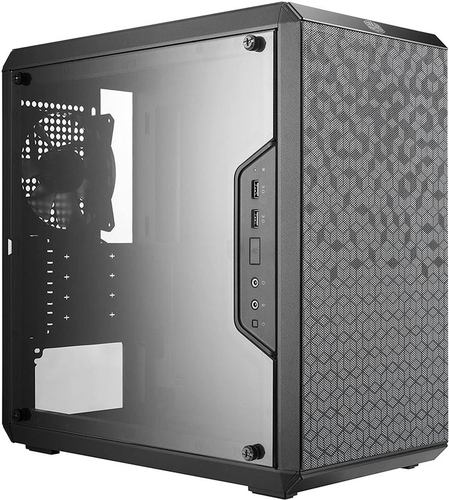
1. Cooler Master MasterBox Q300L
Key Specifications & Features
- Modular I/O Panel: Can be adjusted to six different locations.
- Variable Positioning: Case can be oriented vertically or horizontally.
- Magnetic Dust Filters: Patterned dust filters on the front and top panels are easy to remove for cleaning.
- High Airflow Design: Perforated front, top, and bottom panels facilitate excellent thermal performance.
- Edge-to-Edge Transparent Side Panel: Offers a full view of the internal components.
Analysis The Cooler Master MasterBox Q300L is a highly adaptable and budget-conscious chassis. Its most notable feature is the modular I/O panel, which provides users with exceptional flexibility in how they position the case on their desk. The extensive perforations make it a strong candidate for builds that prioritize thermal management, qualifying it as one of the best airflow PC cases.
The 28mm of space behind the motherboard tray is a thoughtful inclusion for cable management, which can often be a challenge in smaller enclosures. While its construction is primarily steel and plastic, it offers a solid foundation for a first-time build or any user who values function and airflow over premium materials.
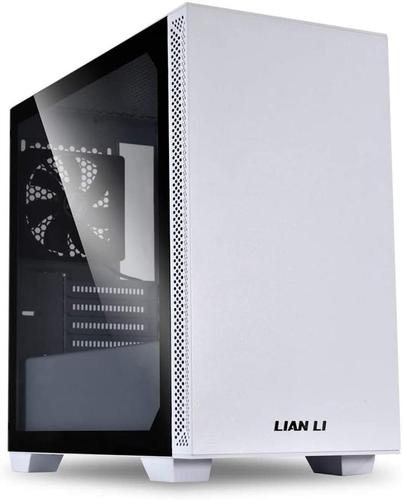
2. Lian Li Lancool 205M Mesh
Key Specifications & Features
- Mesh Front Panel: Designed for high-intake airflow to cool components effectively.
- Dual ARGB Fans: Includes two pre-installed 120mm ARGB fans for lighting and cooling.
- Hinged Tempered Glass: A tool-less hinged side panel allows for easy access to components.
- Removable Drive Cage: The HDD cage can be adjusted or removed to accommodate larger power supplies.
- White Aesthetic: Offers a clean, modern look popular in many contemporary setups.
Analysis The Lian Li Lancool 205M Mesh focuses on delivering strong thermal performance in a clean and modern package. The mesh front panel is its defining feature, directly addressing the cooling needs of high-performance components. This design is often superior to solid front panels for maintaining a normal CPU temperature while gaming.
Its inclusion of two ARGB fans adds immediate value and aesthetic appeal. The case is user-friendly, with features like the hinged glass panel and well-placed cable management cutouts simplifying the building process. It represents a strong middle ground, providing both aesthetic appeal and practical, performance-oriented features.
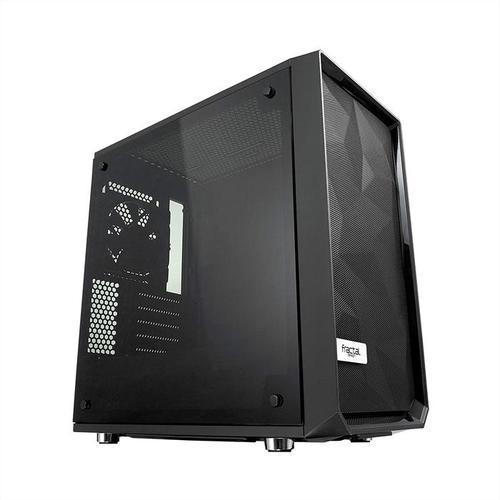
3. Fractal Design Meshify C Mini
Key Specifications & Features
- Iconic Mesh Front Panel: The angular mesh design provides high airflow while acting as a dust filter.
- Unobstructed Airflow Path: An open interior layout from the front intake to the rear exhaust.
- Extensive Cooling Support: Accommodates up to seven fans and radiators up to 280mm.
- Flexible Storage Options: Features a removable drive cage and dedicated SSD mounts behind the motherboard tray.
- Sound Dampening: The steel side panel (non-windowed version) includes sound-dampening material.
Analysis Fractal Design’s Meshify series is renowned for its focus on airflow, and the Meshify C Mini continues this tradition. The case is engineered to maximize cooling potential with its distinctive front panel and open interior. This makes it an excellent choice for users planning to install powerful, heat-generating components, such as a high-end graphics card whose fans are not spinning until a certain temperature is reached, requiring good passive airflow.
The build quality is robust, and the thoughtful layout provides ample room for cable management. With a generous 172mm of clearance for CPU coolers and flexible storage, the Meshify C Mini is a versatile and high-performance chassis for serious builders.
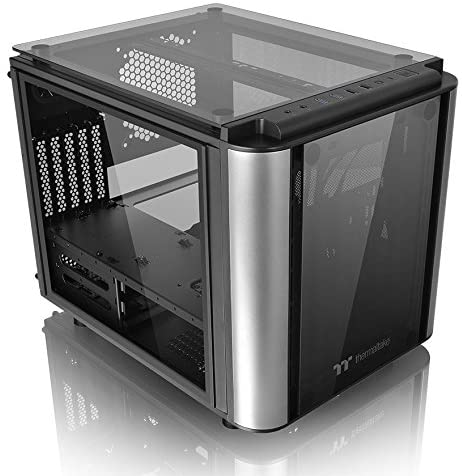
4. Thermaltake Level 20 VT
Key Specifications & Features
- Cube-Style Layout: A dual-chamber design separates the motherboard and cooling from the PSU and drive cages.
- Four Tempered Glass Panels: Top, front, and both side panels are made of 4mm tempered glass.
- Exceptional Component View: The cube design and extensive glass provide a panoramic view of the hardware.
- Large 200mm Front Fan: A pre-installed 200mm front fan provides significant air intake.
- Extensive Component Clearance: Offers some of the best clearance for CPU coolers (185mm) and GPUs (350mm) in its class.
Analysis The Thermaltake Level 20 VT is a showpiece chassis designed to highlight a build’s components. Its cube layout is not just for aesthetics; the two-chamber design helps isolate heat from the power supply and drives, potentially improving the thermal environment for the main components. This is one of many available types of PC cases that deviates from the standard tower format.
The symmetrical design with four tempered glass panels is its main draw. While this much glass can make cable management more critical, the case’s generous dimensions provide ample room to work. It is particularly well-suited for builders who want to create a visually striking system and have plenty of space for large components or even custom water cooling for a GPU.
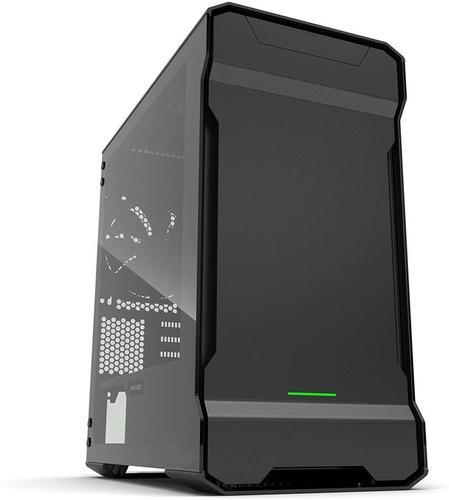
5. Phanteks Evolv mATX Tempered Glass
Key Specifications & Features
- Premium Materials: Features a 3mm sandblasted aluminum exterior and dual tempered glass side panels.
- Hinged Glass Side Panels: Tool-less, hinged panels on both sides offer easy access.
- Excellent Water Cooling Support: Can accommodate radiators up to 280mm in both the front and top.
- Integrated RGB Lighting: Features built-in RGB illumination with options for motherboard sync.
- High-Airflow Design: Despite its solid front, it uses well-designed top and side vents for air intake.
Analysis The Phanteks Evolv mATX TG is a premium case that prioritizes build quality and aesthetics without significantly compromising on performance. The use of thick aluminum panels gives it a substantial, high-end feel that stands out from typical steel cases.
Its support for dual 280mm radiators makes it a top contender for users interested in building a comprehensive liquid-cooled system. The interior is well-engineered, with features like removable radiator brackets and hook-and-loop straps for cable management. This case is aimed at enthusiasts who appreciate superior materials and a refined design and are willing to invest in a more luxurious chassis.
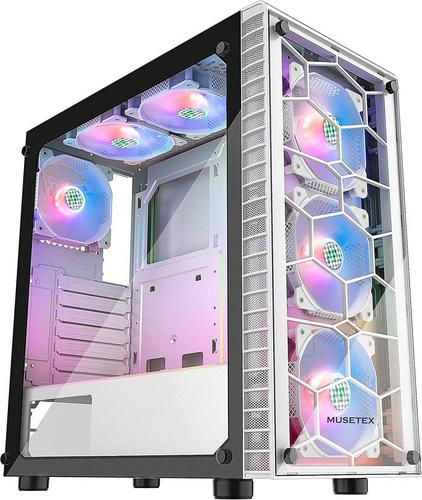
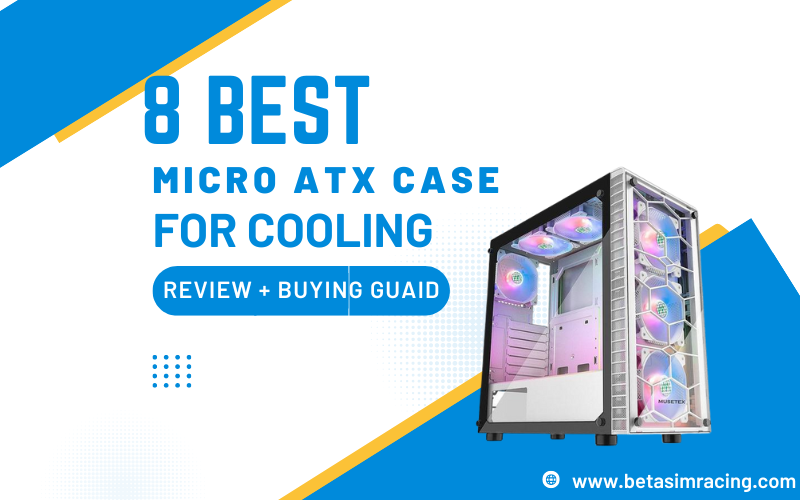
6. MUSETEX G05 Series mATX Case
Key Specifications & Features
- Pre-installed ARGB Fans: Typically comes with six 120mm ARGB fans included, offering immediate value.
- Dual Tempered Glass Panels: Features tempered glass on the front and side for a full view of the interior lighting and components.
- Dedicated RGB Controller: Includes a remote or button controller for managing lighting effects and fan speeds.
- Spacious Interior: Designed to fit standard mATX components with reasonable clearance.
- Multiple Color Options: Often available in both black and white variants.
Analysis The MUSETEX G05 series is an all-in-one solution for builders who want a visually vibrant system out of the box. The primary value proposition is the inclusion of six pre-installed ARGB fans and a controller, which significantly reduces the total cost and effort of achieving a synchronized RGB build.
The dual tempered glass panels are designed to showcase these lighting effects. While the primary focus is on aesthetics, the six fans can provide substantial airflow. This case is particularly suitable for gamers and builders for whom RGB lighting is a key part of their setup’s identity. Before assembly, it’s crucial to understand the proper use of what motherboard standoffs are to ensure no electrical shorts occur.
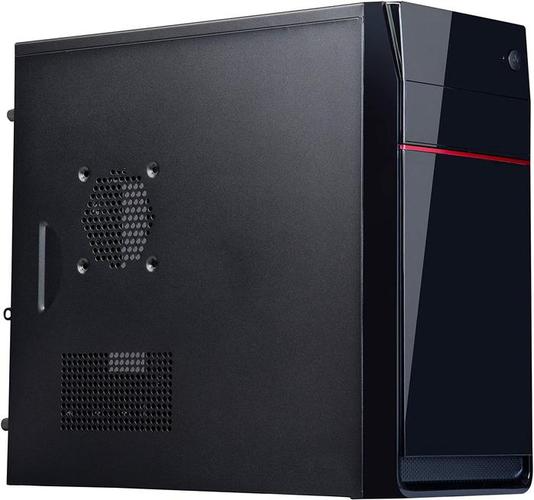
7. Rosewill SCM-01B
Key Specifications & Features
- Budget-Oriented Design: Engineered to be an extremely cost-effective option.
- Solid Steel and Plastic Construction: Standard materials for an entry-level case.
- Top-Mounted PSU: A more traditional design choice that separates it from many modern cases.
- Compact and Lightweight: Its small dimensions and light weight make it easy to handle.
- Sufficient Ventilation: Includes side panel vents for additional airflow.
Analysis The Rosewill SCM-01B is a purely functional, budget-focused chassis. It provides the essential framework for a Micro-ATX build at a minimal cost. Its feature set is basic, forgoing tempered glass, extensive water cooling support, and premium materials in favor of affordability.
The top-mounted PSU design is a throwback to older case standards. While it can house a capable system with a GPU up to 330mm in length, its limited clearance for CPU coolers (140mm) and minimal fan support require careful component selection. This case is best suited for basic office PCs, budget-friendly builds, or any scenario where minimizing cost is the absolute highest priority. For those new to system building, learning how to clean a motherboard and other components is a vital skill for long-term maintenance.
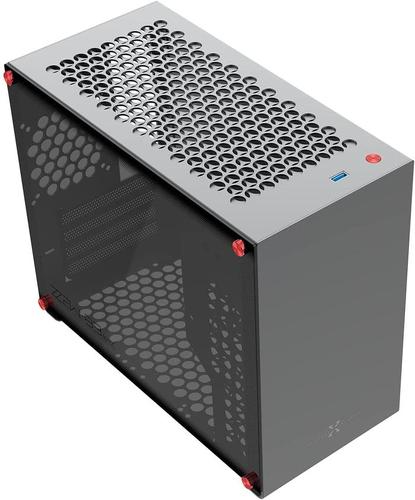
8. ZZAW B3 Aluminum Case
Key Specifications & Features
- Full Aluminum Construction: The main chassis is built from aluminum, providing a premium feel and lower weight.
- Compact “Shoebox” Design: A very small footprint, ideal for space-constrained setups.
- Hardware Versatility: Despite its size, it can support long GPUs and standard mATX components.
- Bottom Radiator Mount: Uniquely supports a 240mm radiator at the bottom of the case.
- Modern Front I/O: Includes a USB-C port, a feature not always present on smaller cases.
Analysis The ZZAW B3 caters to the Small Form Factor (SFF) enthusiast who still wants the expanded connectivity of a Micro-ATX motherboard. Its aluminum construction and minimalist design give it a distinct, high-end aesthetic similar to many boutique SFF cases.
Building in a case this small requires careful planning, especially concerning component dimensions and cable routing. The bottom-mounted radiator support is an innovative solution for cooling in such a tight space. This case is an excellent choice for experienced builders looking to create a powerful yet highly compact system with a premium, all-aluminum finish. It’s a prime example of the many unique PC cases available on the market.
Key Considerations When Selecting a Micro-ATX Case
Making an informed decision requires evaluating several key factors beyond just the product list. Understanding these elements will ensure the chosen case meets all the requirements of your intended build.
Component Clearance and Compatibility
Before finalizing a case, verify its clearance specifications against the components you plan to install.
- GPU Length: High-performance graphics cards can be very long. Ensure the case’s maximum supported GPU length is sufficient.
- CPU Cooler Height: Air tower coolers vary greatly in height. Check the maximum cooler height to avoid interference with the side panel.
- PSU Length: While most cases fit standard ATX power supplies, compact models may have length restrictions, especially if drive cages are not removed.
Thermal Performance: Airflow and Radiator Support
Effective cooling is crucial for system stability and performance.
- Airflow: Cases with mesh or perforated front panels generally offer superior air intake compared to solid panels. The number and size of fan mounts are also critical indicators of cooling potential.
- Liquid Cooling: If you plan to use an All-In-One (AIO) liquid cooler or a custom loop, check the case’s radiator support. Note the supported sizes (e.g., 120mm, 240mm, 280mm) and mounting locations (front, top, rear). Answering “do you need a good motherboard for gaming” often involves considering its ability to handle the power delivery for components that generate significant heat.
Storage Capacity and Drive Bays
Consider your current and future storage needs. Most cases offer a combination of 2.5-inch bays (for SSDs) and 3.5-inch bays (for HDDs). Some compact cases sacrifice 3.5-inch drive support to save space, so verify that the case has the number of bays you require.
Build Quality, Materials, and Aesthetics
The case is the most visible part of your PC.
- Materials: Cases are typically made of steel (strong, cost-effective), aluminum (lighter, premium feel), and plastic. Side panels can be solid steel, acrylic, or tempered glass.
- Aesthetics: Choose a design that matches your personal preference, whether it’s a minimalist enclosure, an RGB-focused showpiece, or a rugged, industrial-style tower.
Front Panel I/O Connectivity
The front I/O panel provides easy access to essential ports. Check for the number and type of USB ports (e.g., USB 3.0, USB-C) and the presence of audio jacks. Knowing about the different connectors, like what USB headers are, is important for connecting these ports to the motherboard.
Frequently Asked Questions (FAQ)
Is a Micro-ATX case worth it?
Yes, for many builders, a Micro-ATX case provides the ideal compromise. It offers more expansion slots and features than a Mini-ITX system while being more compact and often more affordable than a full ATX tower, making it a highly versatile choice.
What should I look for in a Micro-ATX case?
The most important factors are component compatibility (GPU length, CPU cooler height), cooling performance (airflow design and radiator support), storage options (number of drive bays), and build quality that fits your budget and aesthetic goals.
Is Micro-ATX good for gaming?
Absolutely. A Micro-ATX system is fully capable of housing high-end gaming components, including powerful processors and full-length graphics cards. As long as the case provides adequate airflow and clearance, it can be the foundation for a top-tier gaming PC.
Can a full-size GPU fit in a Micro-ATX case?
Most modern Micro-ATX cases are designed to accommodate full-size, high-performance graphics cards. However, it is crucial to check the maximum GPU length specification for the specific case and compare it to the dimensions of your chosen graphics card.
Do Micro-ATX cases have good airflow?
Case airflow is determined by design, not form factor. Many Micro-ATX cases, especially those with mesh front panels and multiple fan mounts, are designed specifically for high airflow and can cool components just as effectively as larger towers.
Is it harder to build in a smaller case?
Building in a Micro-ATX case can be slightly more challenging than in a spacious ATX tower due to the reduced room for cable management and component installation. However, they are generally much easier to work in than a more restrictive Mini-ITX case.

Aarav is a custom PC building virtuoso and the head of our PC Builds and System Requirements sections. He specializes in creating clear, step-by-step guides that demystify the process of building a high-performance gaming rig. His meticulous testing ensures our system requirements guides are the most accurate and reliable available.