
Forza Horizon 5 takes us to the peaceful country of Mexico and perhaps the most extensive entry in the franchise yet. However, for new players, there is so much to do. It could be overwhelming, so here I look at gold as an experienced veteran of the Forza Horizon games. I will give you my advice on how to get started. If you wish to smash in Forza Horizon 5 solar panels, you need to see a few things before that.
Forza Horizon Features
There are many different events, from road races to cross-country events, so it’s essential to know which cars work best for what. 200 miles per hour Lamborghini will tear it up in road racing and leave your opponents in the dust, but it does not suit racing off-road.
Horizon simplifies this process though every time you start a new event. It will show you a list of cars you own best suited to your chosen event. If you are going on a street race, you need a car that goes faster and handles well.

The game has incredible progression. The festival feel is on the next level. The characters, the cars, the locations, and the road to armor are just better with many luxuries. It also elaborates on car physics like the tire grip, suspension travel, and general tuning capabilities to the beautiful open world spanning multiple biomes.
Related Article: how to unlock the goliath in forza horizon 5
How Big is Forza Horizon 5?
This is one of the most predictable games with gorgeous graphics. The storage information of the game is here. It will be a hefty install as it is 103 GB windows if you download it through an Xbox game pass. This is an enormous open-world game. This game cost over $60. There is a deluxe edition and a premium edition of the game.
The minimum requirements of the system for this game installation are as under.
- Processor: Intel i5-4460 or AMD Ryzen 3 1200
- Processor memory: 64 bit
- Operating system: Win 10
- RAM Memory: 8GB
- Graphics: NVIDIA GTX 970 or AMD RX 470
- DirectX: Version 12
- Network: Broadband Internet Connection
- Storage: 110GB available space

Custom Race in Forza Horizon 5
There is a little bit of one-time work we have to do:
- First, drive to a random race location and choose your route. Drive in a short circle to complete the track and save it with a throwaway name. You won’t be using it anymore. We just needed an easy way to create an event lab for the first time.
- We are now in the event lab screen, where you can choose all the settings for your event.
- First, name the event. Set something generic here, like using your name. You will use this event lab every time you start a race, so wait to go tilting at something race specific.
- You can set the number of labs which vehicles to allow, or which classes. If you don’t want to limit your friends, everything goes in the ghost category.
- Most importantly, there is a section to select a route. This screen will use to pick any of the original Horizon routes or custom routes you might have created.
- Once everything is set, click Publish to save it.
- Now back out of it, don’t go starting to race alone.
- Now from the pause menu, you can go to your creative Hub and select my events.
- You will always find your event lab here.
- Click to edit the creative lab to change the track and settings or on it to queue into it alone or with your friends.
- Whatever you are done and want to raise another track, edit this event lab and publish it.

Forza Horizon 5 Treasure Chest
Treasure Hunts are weekly challenges in the game that are found in the tab of your current season. Treasure Hunt in Forza Horizon 5 Mexico holds your horses and earns 10 stars from PR Stuns. After finishing the treasure hunt, you will get a treasure Chest that awards you spinning, credits, and more.
First, you will complete a challenge and find the location of your treasure chest. This location needs to be searched for finding a treasure chest. It is a large wooden box with letters of Horizon carved. You need to break them with your car and find your rewards.
When you win a road race event, you will find the first treasure chest with a track toy car. After that, you will see an orange circle on the map that shows the Southern Eastern corner. You will have to find the treasure hunt outside the circle.
Forza Horizon 5 Solar Panels Location
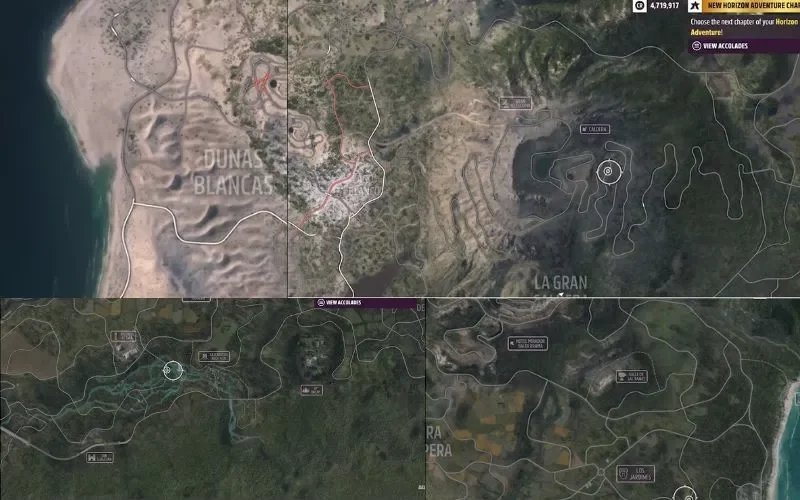
We have got a collectible challenge lights out Forza 5 smash 20 solar panels. Here are the locations of solar panels. It is a quick way to get three points towards your new series, Three Summer Festival Playlist. The location is on the map below the highway, and not far from the festival, you can find specific marks of solar panels.
Selecting the Car
- The first thing is to get a Retro Muscle vehicle.
- To do that, change your vehicle by going to filter.
- You will find a Retro Sports car.
- Then clicking on that, you will see Modern Muscle cars.
- Now you can pick any car you like from the menu.

Find Location and Smash Solar Panels Forza Horizon 5
- You know the location is near the festival with the small rectangular dots.
- You will have to go fast in your car. You need to go off-road and smash those panels.
- There are tons of Forza 5 Smash Solar Panels lines.
- Just move your car fast, and they all will be smashed.
- Now turn back and again smash the lines.
How to Get Accolade?
There is also an accolade in the discovery and collections category. It requires smashing 100 solar panels and then driving the 95 eclipses. Many accolades in the game require racing. Most circuits and sprints are long, so you need to turn them back to one lap. Let’s say, for instance, you create a blueprint. Go to event settings and put it on one lap. It will be a lot quicker.
Choose the shortest track. Now publishing your event labs, you will get more accolades. You can get accolades racing with apex circuits and dirt apex circuits. Caldera scramble is the shortest for the dirt. Arch of Manage is another good short racing. Many of the accolades are self-explanatory. They need something to do.
FAQs:
What vehicle has the most power in Forza Horizon 5?
The most horse-powered Vehicles in Forza Horizon are Mercedes Trucks. The racing trucks and the Unimog make 2400 horsepower when they are maximum upgraded with the engine swap.
What car has the most power in Forza Horizon 5?
The most powerful car in Forza Horizon 5 is the 2020 Lotus Avaya. It has 1973 Horsepower and 1700 NM of torque. It weighs up to 1680 Kg.
Are there any secret cars in Forza Horizon 5?
Yes, there are 5 private cars in Forza Horizon 5.
1969 Classic Dodge car
1995 Porsche GT2 911
Savannah RX 7
Lambhoginni Diablo SV
Jeep Rubicon
What is the fastest stock car in Forza 5?
Agera RS is the fastest stock car in Forza Horizon 5 with 280 miles per hour speed.

As a former QA Lead for a major RPG studio, Freja possesses an unparalleled understanding of game mechanics and systems. She is the architect of our in-depth Game Guides, specializing in creating comprehensive walkthroughs and optimized character builds. Her guides are designed to help players master their favorite games and uncover every hidden secret.