
The PlayStation 5 (PS5) is the latest gaming console from Sony, known for its powerful hardware and extensive game library. However, as your game collection grows, you may find yourself needing to delete games to free up storage space or simply to declutter your library.
In this guide, we will explore how to delete games on PS5, uninstall them without losing data, redownload deleted games, understand what happens when you delete a game, and troubleshoot common issues.
What Happens When You Delete a Game on PS5?
When you delete a game on your PS5, the following happens:
- You can free up the space in your console to save other content.
- Game saves and progres retsained unless you specifically delete them.
- Any associated game updates and patches are also deleted.
- The game remains in your library, and you can redownload it at any time.
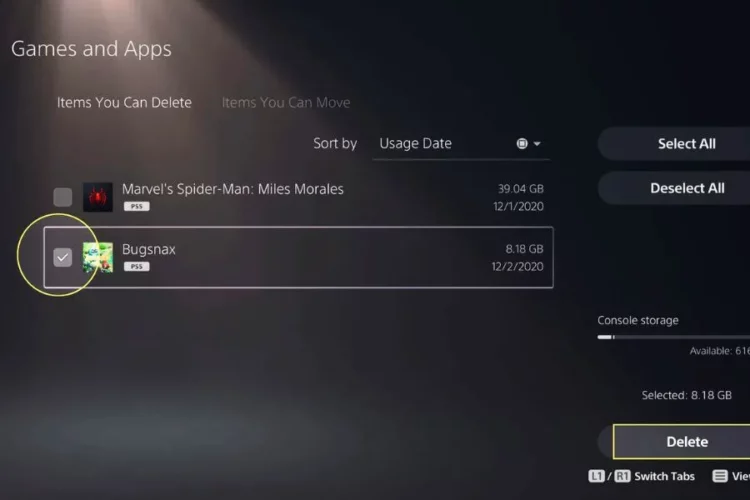
How to Delete Games on PS5?
Deleting games on your PS5 is a straightforward process. Follow these steps:
- Turn on your PS5 and ensure you’re logged in to the account associated with the game you want to delete.
- From the PS5 home screen, navigate to the Game Library. You can find this in the Games section.
- In your Game Library, locate the game you wish to delete.
- Highlight the game, press the Options button on your controller, and select Delete.
- Confirm your decision and the game will remove from your PS5’s storage.
Warning: Do Not Lose Your Data
How to uninstall games on PS5 without losing data? If you want to uninstall a game but retain your game saves and data, follow these steps:
- Navigate to the Game Library as described in the previous section.
- Locate the game you want to uninstall and highlight it.
- Press the Options button and select Manage Game Content.
- In the Manage Game Content menu, you can choose which elements to delete. To keep your game safe, ensure they are not selected.
- Then, proceed to delete the game.
Recovering Deleted Games on PS5
If I delete a game on ps5 can I redownload it? Yes, you can redownload deleted games on your PS5 if you have previously purchased them or if they are part of your PlayStation Plus or PlayStation Now subscription. To re-download a deleted game.
- Go to the PlayStation Store on your PS5.
- Navigate to the Library section.
- In your Library, you will find a list of all your purchased and previously downloaded games. Locate the game you want to reinstall and select it.
- Choose Download to start the installation process. You won’t be charged again if you’ve already purchased the game.
Permanently Deleting a Game from PlayStation
How do I permanently delete a game from PlayStation? If you want to permanently remove a game and all its associated data from your PlayStation account, follow these steps:
- Log in to your PlayStation account on a web browser.
- Navigate to your Library.
- Locate the game you want to remove and select it.
- In the game’s overview, click on Delete.
- Confirm your choice and the game will permanently remove from your account.
How Do I Uninstall a Disc Game on PS5?
Uninstalling a disc-based game on your PS5 is similar to uninstalling a digital game. Follow these steps:
- Ensure the game disc is not in the PS5’s optical drive.
- From the PS5 home screen, navigate to the Game Library.
- Find the disc-based game you want to uninstall.
- Highlight the game, press the Options button, and select Delete.
- Confirm the deletion and the game will remove from your PlayStation 5 storage.
Why Can’t I Delete a Game on My PS5?
If you face any issues during deleting the game on your PS5, it may be due to various factors.
Corrupted Data
If the game data is corrupted, you may not be able to delete it using the standard method. Try rebuilding your PS5’s database or using the “Delete All” option for that game.
Permissions
Ensure that you are logged in with the account that has the necessary permissions to delete games.
Locked Content
If the game is part of your active subscription (e.g., PlayStation Plus), make sure your subscription is active. Some games may become unplayable if your subscription lapses.
Parental Controls
If you have parental controls enabled, check if they are restricting game deletion.
Can you uninstall games on the PS5 app?
No, you cannot uninstall games directly from the PS5 app. Game uninstallation must be done on the PS5 console itself.
How many games can PS5 hold?
The PS5 comes with an 825GB SSD, but the available storage for games is around 667GB. The number of games it can hold depends on their sizes, but it can typically store around 10 to 15 large AAA games.
How do I increase space on my PS5?
To increase storage space on your PS5, you can connect an external USB drive for game storage or replace the internal SSD with a compatible larger one following Sony’s guidelines.
How to permanently delete games from ps5 library?
To permanently delete games from your PS5 library, you can’t actually remove them from your account history, but you can delete them from your console’s storage. Go to Settings > Storage, select the game, and delete it. However, purchased games will remain associated with your account and can be re-downloaded.
Keeping your PS5 game collection organized and making sure you have enough space is important for a good gaming experience. If you ever need to remove games to make room or just tidy things up, these instructions and suggestions will make it easier to manage your games on your PS5.
Final Thoughts

As our senior Console Gaming Specialist, Mack explores the entire console ecosystem, from hardware nuances to first-party exclusives. With over 20 years of gaming experience, his reviews and guides focus on game design, narrative impact, and the overall player experience. He aims to help readers discover which games will truly resonate with them.